
Most teams get MCP working and feel great about it. Then things start to slow down. Inference costs creep up. Agent performance degrades in ways that are genuinely hard to diagnose. The cause is structural token overhead — not a configuration issue.
Raw MCP tool definitions load into the context window at session start, before your agent processes a single query. At small tool counts that is fine. At enterprise scale it becomes an architectural constraint. Code Mode is the pattern designed to address it — sitting above MCP, using MCP schemas as its foundation rather than replacing them.
This article gives you a decision framework: when raw MCP tool calls remain the right choice, when Code Mode becomes the better option, and how JetBrains’ Agent Client Protocol (JB ACP) fits in at the IDE layer. For foundational context see our MCP overview. No code examples here — this is the “when and why.”
What is the architectural limitation of raw MCP tool calls at enterprise scale?
Raw MCP requires all tool definitions to load into the LLM context window at session start. Every schema adds tokens before your agent does anything useful.
The numbers make this concrete. Cloudflare found that 52 tools from four internal MCP servers consumed approximately 9,400 tokens purely for their definitions — before a single piece of work began. A naive MCP server exposing the entire Cloudflare API would consume 1.17 million tokens, which exceeds the context window of most advanced foundation models.
The downstream effects compound. Less context budget means less room for conversation history, retrieved data, and reasoning. Inference costs inflate proportionally. Teams that start with 10 tools often reach 50–100 within months. As Cloudflare put it: “After months of high-volume MCP deployments, we’ve paid out our fair share of tokens. We’ve also started to think most people are doing MCP wrong.”
That is the signal your team has outgrown the raw MCP pattern. The MCP architecture Code Mode builds on works well for small tool surfaces — it needs a layer above it once that surface grows.
What is Code Mode and how does it change the agent-tool interface?
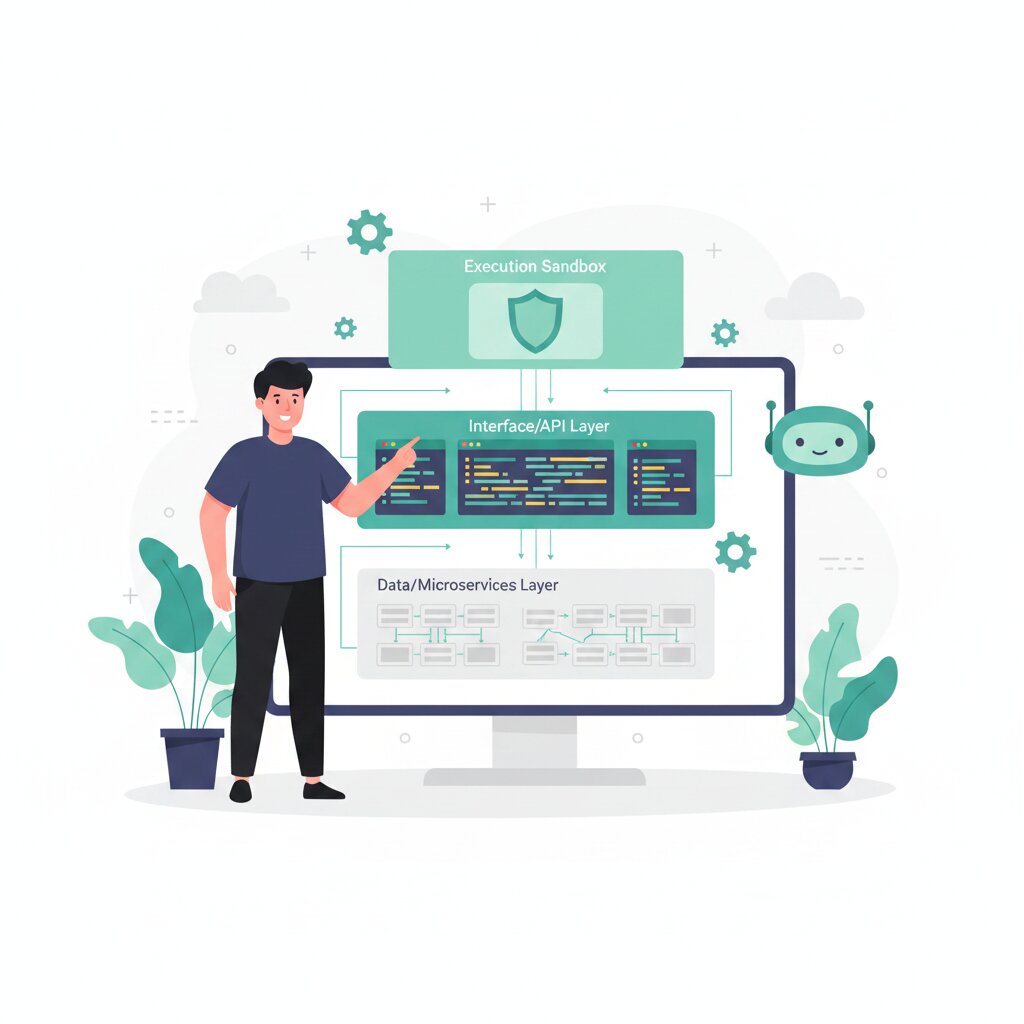
Code Mode converts MCP tool schemas into a typed API. Instead of loading every operation as a separate tool definition, the agent writes code against that typed API and executes it inside a sandboxed runtime.
With just two tools — search() and execute() — a Code Mode MCP server can expose the entire Cloudflare API while consuming roughly 1,000 tokens. That is a 99.9% reduction compared to the 1.17 million tokens an equivalent naive MCP server would use. The token footprint stays fixed regardless of how many endpoints exist.
There is also a context pruning benefit, and this is separate from the API surface size reduction. StackOne’s benchmarking tracked intermediate workflow data: a single workflow generated around 14,000 tokens of raw JSON inside the sandbox, but what returned to the LLM context was a 500-token summary — a 96% reduction. The raw data never entered the main context window.
Progressive disclosure is the underlying principle: capabilities surface on demand rather than loading upfront. Anthropic’s code execution with MCP implements the same approach with a search_tools tool that fetches only the definitions needed for the current task. Anthropic’s variant is Python-based rather than TypeScript and V8-based, but the architectural logic is identical. Two teams independently arriving at the same pattern is a reasonable signal it represents a genuine shift.
Code Mode is a design pattern, not a protocol. It uses MCP schemas as input and builds a typed abstraction layer above the MCP integration substrate.
Code Mode vs. raw MCP tool calls: a decision framework
The choice between raw MCP tool calls and Code Mode comes down to four variables: number of active tools, workflow complexity, reliability requirements, and where your team sits on the adoption curve.
Use raw MCP tool calls when your active tool count is small — roughly under 20–30 definitions. For single-step workflows with predictable tool selection, Code Mode adds unnecessary complexity. StackOne’s analysis is blunt about this: direct calling wins for simple, single-tool tasks, and when users need to approve each individual action, the explicitness of raw tool calls is an advantage.
Use Code Mode when your tool count is large and growing. The practical threshold is around 10,000 tokens of intermediate data per task — above that, Code Mode keeps raw API responses out of context entirely. Multi-step workflows touching two or more providers benefit from handling everything in a single code block rather than across multiple round trips.
A hybrid architecture is a valid third option. StackOne runs agents that switch between modes dynamically: simple queries through direct tool calls, complex multi-step workflows through Code Mode. It does not have to be all-or-nothing.
Code Mode extends MCP — teams add a layer above it, they do not abandon what is already working.
What is JetBrains’ Agent Client Protocol (JB ACP) and how does Koog use it?
A quick but important disambiguation upfront: JetBrains’ Agent Client Protocol (JB ACP, agentclientprotocol.com) is a distinct protocol from the AAIF ACP — the result of the IBM ACP and Google A2A merger under Linux Foundation governance. Both use the “ACP” acronym; they address entirely different parts of the agent stack. The AAIF ACP handles agent-to-agent messaging. JB ACP handles agent-to-IDE connectivity.
JB ACP is an open protocol co-authored by JetBrains and Zed that exposes IDE capabilities — file editing, navigation, build, run, debug — as structured agent tools. All IntelliJ-based IDEs support it. JetBrains draws the analogy to the Language Server Protocol: a standard at the point where editors and tools meet, enabling choice rather than lock-in.
The practical outcome is a bring-your-own-agent pattern. Any ACP-compatible agent can work directly inside IntelliJ without licensing JetBrains AI Assistant. Developers choose the agent and stay in the IDE they know.
Koog is JetBrains’ open-source Kotlin-based agent framework that implements JB ACP. It supports MCP and A2A integration alongside JB ACP, and targets JVM, Android, iOS, and WebAssembly. If your engineering team uses JetBrains IDEs, Koog and JB ACP represent an IDE-level architectural decision point analogous to the Code Mode decision at the API tool layer. For the broader enterprise platform picture, see the Koog comparison with ADK and Foundry.
When does Code Mode become the right architectural choice?
There is an identifiable inflection point: token overhead that measurably degrades agent reasoning quality, or inference costs that have become a real budget line item.
Tool count is the most reliable indicator. The problem becomes visible around 30–50 simultaneously active tool definitions. At the 100-tool threshold it becomes a production priority. Workflow complexity is the secondary signal: when agents chain more than three or four tool calls in a single workflow, the compounding token cost accumulates fast without Code Mode’s context pruning.
The cost justification is straightforward. Because Code Mode’s token cost stays fixed as more MCP servers are connected — unlike raw MCP, where cost grows with each tool added — the value compounds over time. Inference cost savings at production scale typically justify the architectural migration within months.
If your team uses JetBrains IDEs, the JB ACP and Koog decision is separate — driven by developer experience priorities rather than token overhead. The two decisions are independent of each other.
The agent architecture stack now has clear layers: MCP as the integration substrate, Code Mode as the efficiency layer above it, and JB ACP as the IDE-layer integration. Each is addressable independently as scale and requirements evolve. For a complete orientation to the full MCP landscape — from foundational architecture through governance, security, and platform selection — see our MCP overview.
FAQ
Is Code Mode a protocol or a design pattern?
Code Mode is a design pattern coined by Cloudflare. It uses MCP tool schemas as input and builds a typed abstraction layer above them. No new communication protocol is defined.
Does Code Mode require specific LLM capabilities?
Yes. Code Mode requires the LLM to write valid code — TypeScript in Cloudflare’s implementation, Python in Anthropic’s — against a typed API. Models with strong code generation perform best. The pattern is not Claude-exclusive, but Anthropic’s Claude models are the primary validated implementation.
Is JetBrains ACP the same as the Linux Foundation ACP?
No. JetBrains Agent Client Protocol (JB ACP, agentclientprotocol.com) is a separate IDE-connectivity protocol. The AAIF ACP originated as IBM/BeeAI’s REST-based messaging protocol in March 2025 and merged into A2A under the Linux Foundation in August 2025. They share the acronym and nothing else.
How much token reduction does Code Mode deliver?
It depends on API surface size. Cloudflare documents 99.9% for a 2,500-endpoint API (1.17 million tokens to under 1,000). Their internal portal shows 94% for 52 tools across four MCP servers. StackOne independently documented 96% in a workflow benchmark. The range varies; the direction is consistent.
What is Programmatic Tool Calling and is it the same as Code Mode?
Anthropic’s Programmatic Tool Calling (PTC) is their implementation of the same architectural pattern — agents execute code against tool APIs rather than calling discrete tools. Python-based, uses Anthropic’s code_execution tool rather than a V8 sandbox. Conceptually equivalent to Code Mode; different implementation stack.
What is the difference between a V8 sandbox and a container for Code Mode execution?
Cloudflare’s Dynamic Workers (V8 isolates) start in a few milliseconds — roughly 100x faster than a typical container. No limits on concurrent sandbox instances. The trade-off is that V8 isolates are stateless and more memory-constrained than containers.
Can Code Mode be used with any MCP server or is it Cloudflare-specific?
The pattern is not Cloudflare-specific — Anthropic’s PTC and Block’s Goose independently validate the same approach. Cloudflare’s specific implementation is Cloudflare-native, but the SDK is available open-source via the Cloudflare Agents SDK.
What is progressive disclosure in the context of Code Mode?
API capabilities surface on demand rather than loading upfront. In Anthropic’s implementation, a search_tools tool fetches only the definitions needed for the current task. In Cloudflare’s Code Mode, the typed API exposes a fixed small interface regardless of how many underlying endpoints exist.
When should a team use a hybrid architecture?
When the tool mix is uneven: a small number of well-understood discrete tools alongside one or more large API surfaces. Simple single-tool queries route through raw MCP; complex multi-step workflows generating large intermediate data sets route through Code Mode. StackOne runs this pattern dynamically.
Does Koog require JetBrains AI Assistant?
No. Koog is open-source and Kotlin-based. JB ACP enables bring-your-own-agent patterns so teams can connect their own agents to IntelliJ-based IDEs without licensing JetBrains AI Assistant.
How does state management work in Code Mode compared to raw MCP tool calls?
Raw MCP reloads all tool definitions at each session start. Code Mode architectures can reuse generated API client code across executions, and context pruning keeps intermediate results out of the main context window.
What are the UTCP contributors’ connections to Code Mode?
Some contributors to the Universal Tool Calling Protocol (UTCP) were also involved in establishing the Code Mode architectural pattern, reflecting the broader community push to address MCP’s context-overhead limitations.