We see the same questions about app development coming up again and again. It’s no surprise. More and more businesses are recognising that they need apps. Developing apps is a complex and opaque process. They’re big ticket items where unscrupulous operators don’t want to share numbers until they can guess how much you have to spend.
We’re going to fix that. By answering your questions. Many of them are of the “how long is a piece of string” variety. We can’t tell you how long a piece of string is, but in our answers we do give some recommendations on how you should be thinking about your string. Or, for this article, how to think about your app and how you’re going to get it built.
Q: How much does app development cost?
Short answer: Under $50,000 for a simple app. Under $150,000 for a basic app. Over $150,000 for a complex app.
Long answer:
You need to be comfortable with spending 5 and 6 figure sums if you want to build a competitive app. If you don’t think you’re going to earn the money back then now might not be the right time to start the process. Maybe start with a basic website.
The cost at each tier comes down to complexity. That complexity is a combination of frontend features, backend/admin features, third party integrations, the amount of business logic that needs to be encoded (after being documented!), and the variety and volume of traffic and transactions your app needs to handle.
A short discussion with us about your app, your market, and the features you want would enable us to tell you which range your app would fall into.
Q: Why does app development cost so much?
Short answer: Details x Time x Expertise
Long answer:
We understand this question. Unless you have worked as a developer on multiple similar projects it can be impossible to look at the screens of an app and see where 5 and 6 figure sums were spent. Hint: a lot doesn’t show up in the user interface.
App development costs what it does for two main reasons: it requires expertise and it takes time. And then there are the details. Building software is all about managing a mind-boggling number of details. It is not unlike building an actual sized house out of Lego bricks. Individually positioning all those little pieces adds up to a lot of time. And you need people who know how all the pieces fit together.
When looking at the cost it helps to remember app development is an investment. You invest in an app to generate revenue. Much as you might buy a machine for a factory, or pay to rent, fit-out and stock a brick and mortar retail store. You expect your big investment to give you more in return.
Of course you’re cost conscious. You spend your money wisely. That is why SoftwareSeni provides full transparency during the entire app development process. You can see the time spent at each stage of app development and even for each feature. Also for all the code that doesn’t touch the screen – the integrations with other services, the code that talks to the database, the code that creates the backend that your business will use.

Q: How long does app development take?
Short answer: At least a couple of months to launch. Then months to polish. Then years to grow.
Long answer:
Our business philosophy combines Lean and Agile methodologies. Under Lean, businesses want to be launching an MVP (Minimal Viable Product) as soon as possible to verify their idea, start gaining users, and start generating revenue.
This is done by implementing features in two-week work blocks called sprints under Agile. You won’t be launching your MVP app after 1 sprint, but 4 isn’t impossible, and 6 is feasible. All depending on your feature set and how far advanced your product conception is, of course.
And once launched, new features continue to be added using two-week sprints, along with addressing any user feedback received along the way.
This process results in lower upfront costs, puts a working Android app or iOS app, or both, in front of your customers sooner, and enables you to start generating revenue sooner.
Q: How big a team do you need for app development?
Short answer: 3-5 depending on the stage of development.
Long answer:
The app stores are filled with apps built by a single developer. So is that all you need?
Maybe? But there is only so much a single developer can do in a week. Or a month. There are only so many facets of app development a single developer can be an expert at. And how many developers are also experts at graphic design or UX or at running user testing?
And the big issue with a single developer – it only takes a single accident, or a single personal crisis, for your app development or app support to grind to a halt. What business wants to take on that risk profile?
A serious app, with a sensible launch schedule, that looks good, that works well and continues to work, requires a team. The size of that team depends on the app, its features, and how the development can be scheduled. But we find that, on average, at any particular stage of the app development process, you need about 3-5 people contributing.
It is a truism of software development that the best way to slow down a project is to throw more people at it. At SoftwareSeni we have launched enough apps, and our teams have collaborated on enough of these apps, that we’re pretty good at putting together the optimal team for creating your app.
Q: Should I develop an app?
Short answer: If you have to ask then you should develop a website first.
Long answer:
An app is a major investment. Are you sure you’re going to get a return on that investment? If you’re not sure, if you don’t have a ready market or an eager customer base, then it will be wiser to test your business idea using a website first.
A modern website, designed to be mobile-first, can approach the user experience of a dedicated native app with a lower upfront investment while providing you access to the entire global marketplace across all devices, not just phones.

Q: Should I develop an Android app or an iPhone/iOS app?
Short answer: Android if you want market reach, iPhone/iOS if you want to charge a premium.
Long answer:
In most of the world Android is the dominant mobile operating system, holding about 75% of the global market. But in some markets, like the US, UK, Canada and Australia, iOS holds more than half of the market.
This difference in market share, and user base, leads to a non-intuitive result. Global non-game app revenue in 2020 was $32.1 billion. Despite its smaller global market share, at about 25%, iOS apps captured $24.7 billion, or 77%, of that revenue.
The decision to develop an Android app or an iPhone app comes down to knowing where your audience is and what your goal is.
For markets like Australia, USA, UK and Canada, where the market is almost evenly split, it’s lucky that there are frameworks like React Native that make developing apps for both platforms financially feasible. But still we would recommend focusing on your iOS app first, because that platform will likely provide most of your revenues.
Q: How long does it take for an app to earn back its development cost? Also: How long does it take for an app to cover its running costs?
Short answer: If you read the first question you already know the answer.
Long answer:
This question is looking at app development backwards. You should not be spending money on developing an app, or purchasing any asset, without forecasting or modeling costs and revenue.
The real question should be: given my forecast revenue and current budget, can I build an app with the planned feature set, keep it running, and market it?
(You don’t want to forget your marketing budget. Expecting enough people to simply stumble across your app is not a path to success.)
If the answer to the real question is no, you don’t have enough money to do all that, then you are left with three options:
- Don’t develop an app. Put your money towards another revenue generating project.
- Reduce the scope of your app. Will a simpler, less expensive app bring in enough revenue to fund further development?
- Build a website instead. A Web app or a dedicated ecommerce website development is a faster way to reach an even larger market. Websites can have app-quality interaction (at a price). This approach can allow you to invest even less up front and still have a foundation you can extend as revenue grows. With proper planning, converting it to an app when revenue allows can be quite cost effective.
Still have questions about that app you want developed?
Hopefully by answering the big questions about app development we’ve helped you think strategically about getting your app developed.
If you find you have more detailed questions on costs and starting app development then get in contact with us. We’re always up for a chat and we love finding revenue-focused solutions to app creation.
Now, if you feel like you want a little more background on app development before talking to us, we have written a series of short, easy-to-read articles on the process:
A quick guide to Agile for businesses and start-ups
What is product conception and how to do it
How to prototype your app
Business rules and the business logic that drives your app
How the app development process works
Also, here are two articles that will help with your decision making:
Should you build an app or a website?
Fixed price contract vs Agile for app development
Contact us here for any questions you still need answered.
Should you build an app or a website?The title might strike you as a dumb question. App vs website? We’re deep in the 2020s. You probably already have a website. But if you’re launching a new product or service or ecommerce play, or you’re finding competition is eating into your revenue, then the question is one you’re already asking yourself – go down the path of, say, ecommerce app development, or down the path of ecommerce website development?
This article is going to help you make that decision. It’s going to start with a quick tech review, followed by a short discussion of the trade-offs between the two options, then it will jump into the surprise “have your cake and eat it too” twist.
Let’s start with the tech.
There are only three types of websites
That’s right. Only 3. We’re talking under the hood, not content. Here they are:
Static
Static websites serve visitors pre-generated pages of content. This is how websites worked when the internet was born. It’s had a resurgence in popularity recently due to its speed and security. This tech is best used for sites that don’t change often – blogs, documentation, and brochureware sites.
Dynamic
Dynamic websites serve visitors pages that include content pulled from a database or generated by code. This is called server-side rendering, as the layout and content is assembled by the server delivering the page. It’s more complicated than that, but we’re keeping things simple.
If a website isn’t static then it’s dynamic. This includes the millions of WordPress sites in existence along with every other site on the internet. The term “dynamic” is now more of an umbrella term, as there are many different ways to build a dynamic website. Web apps represent a relatively recent strategy for building dynamic websites.
Web App
You might have seen this style referred to by a couple of acronyms: “SPA” / “PWA”. “Web app” is simpler. and they all mean a website built to behave like an application. Instead of responding to user interaction by following clicked links to new pages rendered by a web server, web apps pull data off the server and redraw the contents of the current page to display it. This is faster than requesting and loading new pages and creates that “app” feel.
The biggest difference between a web app and web site is web apps are more complex than server-side dynamic websites due to the added complexities of marshalling content on and off the page and the richer interactions they tend to implement.
Twitter is an example of a web app that features the kind of detailed interface and high level of interactivity that used to be only associated with dedicated apps.

If a website looks like an app and acts like an app, is it an app?
No. While you can build a website with an app-level user experience, when it is visited from a handset it will not have the integrations into the handset operating system a native app will enjoy. It will also lack the look and feel of a native app, placing it visually in a lower tier.
Performance in some areas will also suffer. The biggest one is smooth scrolling. Despite the power of modern handsets, the complexities of displaying rich content in a browser window is still not as smooth and efficient as within a native app.
Is it easier to build an app or a website?
A modern website built from scratch instead of on top of an existing platform like WordPress or Ghost can be as complicated as an app. When you have things like user authentication, a database for storing data, a way to send emails, an admin interface for tracking metrics and providing customer service features, as well as a professional user interface, you are looking at a lot of code just as you would with an app. With features comes code. There is no avoiding it.
However, there are some tools out there that will make an app from a website. Really, it is just a an app that only displays your website. But users can already access your website on their phone, as we discuss below, so why go this route?
Keeping the killer feature of websites
Websites have one killer feature that apps don’t have – they run everywhere. They run on desktops. They run on phones, no matter who makes them. They can even run on smart TVs.
When you are deciding between an app and a website you need to understand where your users are and how they are going to interact with you.
It’s a balancing act between audience, features that you need, features that will appeal to the audience, and cost.
The cost of websites vs apps
A native app with similar functionality to a website is going to cost more than the website. The main reason is simple economics. The number of app developers is much, much smaller than the number of website developers and demand for their services remains strong.
As each of the two major platforms, Android and iOS, have different development environments, releasing your app on both platforms can (roughly) double your costs.
Another cost apps must pay is time. Getting approval for your app from each platform app store takes time, sometimes weeks, with any problems potentially causing long delays. No-one can stop you from launching a website whenever you want.
Each option has its benefits. But you should know there is a strategy that can get you the best of both worlds – the lower cost and lower time to market of a website, and the power and polish of a native app – while spreading out your risk.

The app that starts out as a website
This is our favourite strategy for creating a new product or service. It combines the rapid development and deployment of a website, while at the same time it lays the groundwork for the heavy lifting required to create an app.
This strategy is based on React Native. React Native is a spin-off of ReactJS, one of the world’s most popular JavaScript frameworks. If you’ve never heard about React Native you might want to read Everything you need to know about React Native apps – the business side.
By building a web app using ReactJS it takes much less effort to convert it to a native app using React Native.
By starting with a web app you can prove the business model of your product or service with a lower investment than going straight to a native app. Once the business model is proven, moving from web app to native app is straightforward.
How straightforward depends on including this path in your strategy. And why wouldn’t you? Your app will use the same backend as your website. Your UX has been tested and proven. If you built your web app on ReactJS it becomes a matter of changing code that would tell a web browser to draw a form to React Native code that displays a native form on a handset.
And the same React Native code works on Android and iOS. You don’t need a separate team for each platform.
The final answer to the app or website question
So, the final answer to whether you should build an app or a website is you should build the website first. A website designed to be a web app. And if you use ReactJS that website will take you 80-90% of the way towards your app.
When the website shows you have a foothold in the market, it is simply a matter of converting the website into a native app.
If you want to know more about this strategy and how it could work with your business, get in contact with us and we can discuss the details with you.
Making it real – the software development process behind your appThis article is going to go into details on the software development process at SoftwareSeni. The target audience is our clients and potential clients. If you’re thinking about getting an app or a site built some day, then you will find it interesting to understand how these processes are run.
The article is a follow on from similar articles on product conception, prototyping, and business rules.
With all the above completed, the software development can now start. If you’re curious about the cost of software development, we recommend reading our article on Fixed Price Contract vs Agile Development.
SoftwareSeni is an Agile house. Software development under Agile has a definite beginning, but it doesn’t really have a middle or an end. This is due to the iterative nature of Agile development. One of the early iterations will see the launch of your product. But once it is live each iteration after that will be launching new features and capabilities.
The beginning of the software development process
At SoftwareSeni we divide the beginning into two phases: Preparation and Kick-off.
In the Preparation phase we take the wireframes and business rules and use them to create the product backlog.
The product backlog is an Agile thing. It is the single source for everything that the dev team needs to work on. So it includes the features of your app that need to be implemented, but it will also contain bug fixes, setting up hosting infrastructure and any changes it needs — anything and everything the dev team needs to complete your app and keep it running.
Using the product backlog, work is prioritised based on impact and effort. The business rules you documented earlier are broken down into epics. The epics are broken down into stories and those are finally broken down into tasks. All of these go into the product backlog.
Because the product backlog is used to prioritise work it is not a static list. Everything that needs to be done gets added to the backlog as it pops up. This requires the product backlog to be regularly updated and re-prioritised. This is part of the Agile process.
Along with the product backlog, the preparation phase involves:
- a sprint plan
- the confirmed timeline and milestones
- a demo plan (both internal and for you)
- establishing development environments (typically separate Dev, Staging and Production systems)
- a QA Strategy and Plan that covers automation, test plans, test scripts, test data, and resource planning.
- a User Acceptance Testing (UAT) plan covering the application security checklist and penetration testing

Kick-off
The kick-off for your project is carried out in two meetings. For you, it’s a briefing where we communicate how the software development will proceed and we all confirm we are in agreement on project goals, deliverables and timelines.
The team runs through the same information in their own meeting. This is also the point where the final structure of the team — headcount and skillset — is settled.
After this, the development begins.
The Agile development of your product
Agile operates as a series of sprints. Don’t imagine a roomful of people pounding at keyboards. Programming is a slow and thoughtful process. Agile packages that process into short, often two week long, periods of focus: the sprint.
If you’re new to Agile you might want to read Agile basics for small businesses and start-ups.
The first series of sprints are focused on getting your MVP in front of customers. Once your app or site is live subsequent iterations make it easy to adapt focus and schedules based on app usage and revealed needs.
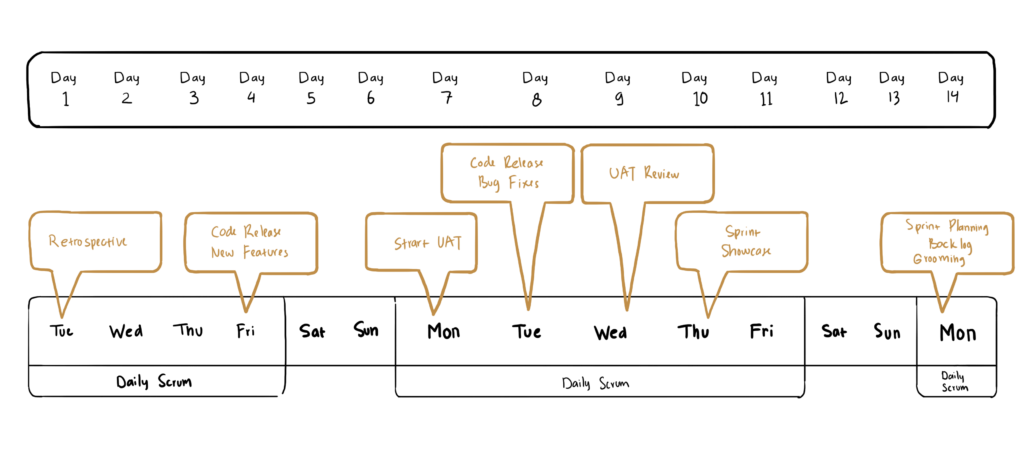
A sprint is divided up into multiple stages that can be summarised as:
- planning what to work on
- doing the work
- reviewing the work
The result is a two-weekly cycle that runs like this:
Keeping you in the loop
The beauty of Agile is the regular feedback on progress that is available. You will have opportunities to review work to date and current progress at multiple stages through the project. This will be via weekly or fortnightly Work In Progress (WIP) meetings. This is on top of the weekly reports and updates that we send you.
These meetings are essential to ensure your vision of the app is being correctly interpreted by the team. This might sound surprising, but every product is the sum of thousands of tiny decisions. Being involved in the process, supplying clear and concise feedback, ensures your vision is fulfilled as efficiently as possible.
Development never runs issue-free. There are always issues related to usability or functionality that could not be foreseen from wireframes and business rules alone. These are the kinds of things that more documentation can’t fix. They can only be discovered during the building and testing.
But this is exactly what the Agile process is designed to cope with. Any issues revealed get added to the product backlog and prioritised and the project keeps moving forward.
Sometimes these issues will impact product scope or your preferred timeline. Agile lets us catch these early and our regular reporting to you ensures you have time to act quickly on them.
Demo day
As you know, software development is often divided between front end — the UI and UX your customers will interact with, and back end — all the code that interfaces with your business, talks to databases, handles logins, etc.
Once the sprints covering both facets of your app reach a mature enough state fortnightly demos begin. These are yet another opportunity to keep development aligned with your vision, to spot any issues and to just enjoy seeing your product coming to life. It’s an exciting part of the process.

Rushing towards launch
Once the demo days start you are closing in on the launch of your MVP. While you are preparing your marketing push for the big day, the SoftwareSeni team is running QA on your app, hunting down and squashing bugs. They are also preparing for the User Acceptance Testing (UAT) to ensure that your app, and your users, will be secure.
The first launch is just the beginning. It’s definitely memorable, but you will be launching a new version with new features and new fixes every two weeks as your user base grows and your product’s functionality grows with them. This process will become part of your business’s day-to-day workflow.
The new normal
The Silicon Valley phrase is “Software is eating the world”. Once your product is live, whatever your business is, it is now in part a software business. And as long as you’re in business, SoftwareSeni will be there to help you with insight, strategy, tech talent, and raw people power.
If you’re ready to transform your business into a software business with an app or website, get in contact and let’s get the process started.
If you’re new to the process, we recommend starting with our article on product conception – bringing your business idea to life.
After the wireframes – the rules at the heart of your appIf you have been reading our series of articles on the app development process, this is where the hard work begins.
If you’ve stumbled upon this article, it follows on from our previous article on prototyping your app. You might want to start on the first article in this series: Product Conception – Bringing your business idea to life.
At this point in the process your wireframes are a beautiful representation of how your app will look. Your clickable prototype is an accurate representation of how some of the features will work. Together they give you a real feel of how it will be to use your app. User-testing with this early stage prototype has shown the people get it and want it.
App development has been fun so far. Your vision has taken form. The process has been visual, iterative and the challenges have been a joy to solve.
Now it’s time for the hard work. If we knew what you were wearing we’d tell you this is the point where you start rolling up your shirt sleeves. Maybe make the first of many strong cups of coffee.
The hard work is producing the business rules for your app. Business rules will be the core of the technical specifications for your app.
Business rules – the core of your app
The business rules detail exactly how each button, each slider, each interface element will work. It will detail how actions taken by your users through your app’s interface will interact with your business processes, third party services, and your backend.
It’s all about the details, details, details, and thinking them through and getting them right. This is why it is hard work. And why it’s important work. Getting your business rules right the first time saves you money and time.
As the core of your app’s technical specification, they will enable the developers to work out the infrastructure you will need to run your app. Things like:
- where your backend will live
- how the backend is structured for scaling and redundancy
- what services you need to run yourself
- what third party services you will contract with
If your business already has technical infrastructure the effort will instead be spent on how to integrate it with your existing set-up.
But those big decisions are things we work on with you. We’re here to give you the benefit of our experience across hundreds of client jobs during every step of the process, including advice on writing the business rules.

What business rules look like
There is no standard format for business rules. Some clients have presented us with complete technical specification documents. Others have used a spreadsheet to list out how they want their app to function. A popular option is laying out the screens created during the wireframe stage alongside the details of how the interface elements on the screens will work. That’s what we’re going to do here.
For this example we are going to pretend that we are building a mobile app for dining recommendations. Let’s call our imaginary app Bancwit. That name needs a few more iterations, but it will work fine for us.
We’re going to specify the business rules for the main screen of Bancwit. This screen is where they start the selection process for a dining destination. It provides access to all the venues registered with Bancwit as well as directing users to venues in their immediate vicinity.
Some of the functionality is obvious, but as you can see below there is some business logic that can’t be derived from looking at the prototype. This can all be done within Google Docs for easy collaboration. Below we use a simple two column table with the screen on the left and the relevant business rules on the right. It helps to work from the top down.
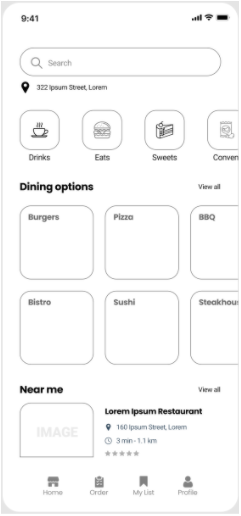
Searches use autocomplete. After first character entered the search overlay appears (see 4b for details)
tapping will bring up map with nearby restaurants (see 4c for details)
Top categories buttons:
- tapping will replace Dining Options panel with category venue options ordered by:
- Special positioning buys
- Paid positioning
- Premium venue members
- Paid venue members
- Other venues
- will be recorded for venues appearing in first 5 positions
Transition to screen 4d.
Dining options buttons:
- Overlay venue carousel (see 4e for details).
- Update Near Me to appropriate venue for dining option
Near Me:
- If no Dining Options category is selected, where distance is within threshold, Venue order will be:
- Special positioning buys
- Paid positioning
- Premium venue members
- Paid venue members
- Other venues
- If a Dining Option is selected, display nearest venue in category ordered by:
- Special positioning buys
- Paid positioning
- Premium venue members
- Paid venue members
- Other venues
- Special positioning buys and Paid positioning venues are distance adjusted by -10% and -8% respectively
- Impression will be recorded for venue appearing in the first position
- Tapping on any part of Near me panel will go to Venue screen 4f.
What business rules aren’t
Business rules are purely about what needs to happen, not how it will happen. The how will be handled by the developers once your business rules are complete. That process will be covered in a future article.
Business rules are not flexible. And they are not vague. The business rules need to be simple and clear enough that a developer can code them without the need to hit you with questions. This is another opportunity to save you time and money. Meeting this level of clarity takes practice. We’ve had the practice and it’s one of the many things SoftwareSeni can assist you with on the path to launching your app.

Let the programming commence
That’s it for this short introduction to business rules. Unless your app has some particularly tricky tech that needs implementing and testing, completing the business rules brings the prototyping phase of your app’s development to an end.
The next step in the process is software development. We will cover how SoftwareSeni handles building your app, and your role in the process, in a future article. Until then, if you have an app or a web site of your own that needs work, or if one of our extended teams will help you hit your goals, get in contact.
Turning your idea into action – the how and why of prototypingFollowing on from our article on product conception (you might want to read that first), this article is about bridging the next gap in the development process.
That gap is the one between having a solidly documented idea and knowing what to build. This is where prototyping takes place.
When you’re prototyping you want to choose the methods and the tools that let you move the fastest, explore the most alternatives, and make the best decisions in the limited time available.
Read on as we cover the prototyping process.
Who are you prototyping for?
From the Lean Canvas that you would have completed as part of your product conception, you will know who your audience is, and within that audience, who your early adopters are.
Your early adopters are the group you’re prototyping for. And who are they? That’s where personas come in.
A persona represents the ideal member of your audience and is based on data gathered by interviewing your potential customers. It is used to direct high level decision making on product features. Instead of asking “What do we do next?”, personas enable you to ask “What would this customer want us to do next?”, reinforcing a focus on delivering value.
You can read more about personas and how to build them in this article and this article.
Personas are a mix of demographics — age, gender, socio-economic status, etc — and needs. Those needs are the ones your product is being built to meet. How your product fulfils those needs are customer journeys.
Customer journeys – trips through your app
A customer journey can be at its simplest the steps a customer goes through to use a feature of your app. For them, it might be finding their dream holiday. For your app, this might involve performing a search, scrolling through options, and tapping a heart icon.
Customer journeys map transactions, transactions that might be essential or emotionally important to your users, to the functional features of your app. This resonance, this emotional value, that is inherent and intrinsic to the use of your app can become invisible to you as cast it into interface elements and interactions. But it is vital to keep your user personas in focus and the needs that drive them to use your app.
From customer journey to screen flow
Finally the sketching can begin! Screen flows are paths touching multiple screens that users will take to complete their journeys. Each required screen needs to be sketched, considered, and re-sketched. The interface elements — displaying information and providing interaction — need to be selected and arranged. It is an iterative cycle of refinement and feedback. You don’t need to invent a new visual language. The more you follow best practices the faster you can move forward.

Finding best practices for your UX
Dribbble.com is a creative community where top designers from around the world share their work. You can check out current trends and best practices in product design and UX for inspiration right here.
A portion of your customer journey, and thus your screen flows, is going to be product hygiene — the basic features common across apps and expected by users. This includes things like authentication, notifications, etc. We discuss product hygiene in more detail in our article How thinking like Frankenstein will help your MVP.
Don’t be afraid to save time and headspace by finding designs that lay out these standard features and cribbing from them. Definitely don’t waste time “re-imagining” them. Save that for your core features.
Building your screen flows
Don’t jump onto the computer too fast. You can move faster sketching wireframes using pen and paper. It’s called paper prototyping. You can do it with blank paper and a pen or you can sketch in device templates you’ve printed out. But don’t go too far down the path of paper kits and cut-outs, etc. You want to sketch enough that you have stopped scratching your head when you think about how a particular feature will operate.
The bonus is that these paper sketches can be used as part of your initial user testing. Grab anyone unfamiliar with your screen layouts. Ask them to point where they would click, get them to tell you what they would do and what they think would happen. Use these tests to iterate on your sketches — you can redraw on the spot — and improve your design before taking it to the computer.
From paper to screen to interactive
Our tool of choice for building wireframes is Figma. It is a web-based, collaborative design and prototyping tool. The way it enables a fluid conversation between designers, users and programmers makes it an essential part of our recommended process.
Figma provides features that allow you to iterate on your UX. You can quickly throw together wireframes with active elements to create a clickable prototype. You use these along with your test users to refine the screen flows that represent your customer journeys.
At the same time, Figma provides the detailed control your designers need to create the branding and polish that will make new users want to download your app.
The design details — sizes, positions, colours — are all communicated cleanly by Figma from the designers to your developers. So when you’re ready to start coding your app it can happen as quickly as possibly.
Iterate, then iterate, then iterate some more
Figma’s ease of use and shareable prototypes means you can be reaching out for feedback as often as your users can stand it.
You’ve already chosen the key feature set your MVP will be launching with. You’ve got your product hygiene features locked down. The more you can test and troubleshoot and streamline your key features before launch the more you reduce the risk at launch.

Time to start building
You’ll know when your customer journeys are ready for the next step. There will be a shared clarity between you, the designers and the users you introduce to your clickable prototypes.
It’s an exciting point to reach. The end feels so close. You can see how your app will look. You have a taste of how it will function. You have users that want it. All that needs to be done now is the coding.
That’s a big step. Too big for this article. We’ll cover it next when we look at Agile development and the MVP.
Until then, if you have some napkin sketches of an idea you want to turn into a prototype, contact us to have a chat.
If you’re not at that stage yet, but you have a business idea, you might like to check out our article on product conception.
Fixed price contract vs Agile for product developmentSoftware is expensive to build. Throwing around the kind of money it costs to build a new product — whether it’s an app or web site — should make you nervous.
And if you’re not familiar with software development, starting down the product path might feel like you’re rolling the dice and hoping for an eleven.
If that captures how you feel, then this article is here to show you that you do have control. Success is never guaranteed, but there are processes and strategies that enable you to move systematically towards the best outcome. Any decent development partner will have these in place.
“Insert cash, get app” is the wrong model
Commissioning a new product is not a transaction. It’s the start of (cue cliché) a journey. It’s going to change your business. You’ll need to onboard new responsibilities. You might need to create new roles.
The first step in taking control is to look at your future product as an investment in a long term process. This opens up opportunities to move your product forward based on new cash flows it will bring in. Which brings us to the biggest decision you’re going to make, and one that our team at SoftwareSeni has strong opinions on.
Fixed price vs Agile
Some people will not give up the “Insert cash, get app” model. This model’s real name is “Fixed price contract” and it drags software development back to the 70s when the Waterfall Methodology was the only option.

Don’t go commissioning waterfalls
For a fixed price contract to avoid cost overruns you need to first scope and price every single thing that needs to be done. This feat of excessive documentation is the start of the Waterfall Methodology. It’s followed by first doing A as described in the documentation, then B, and years later you might be up to L. Forget about Z.
No matter how much documentation is done, scoping and defining a complex project in advance will never get everything right. Issues, oversights, and moving targets will only show up once the project is underway. This inevitability requires budgets to be drawn up that will cover contingency costs. These can increase the final cost by anywhere from 20% to 100%.
That’s right. Your software developer, even SoftwareSeni, will add 20% to 100% to a fixed price contract to protect themselves. And you. You don’t want your software developer going out of business just before your product is finished, do you?
It gets worse. Creating all that documentation delays the start of development. Then there are more delays as developers meet the documentation for the first time and try to understand it. This is slow. It gives the project plenty of time to shift out of sync with the business and the market.
Changing course, which will happen for the reasons given above, requires making changes to the fixed cost plan. Which means more documentation and more time and more billable hours taken to price out the cost variations to catch up with the status quo. And another 20% – 100% on top. It’s a lot of money and none of it is being used to add value for the customers.
Move quickly, be Agile
At SoftwareSeni we find our clients get the best outcomes using an Agile methodology. If this is all new to you we suggest you read this quick introduction on Agile. When using the Agile methodology product development starts with a high level estimate based on an hourly rate.
The high level estimate
To arrive at a high level estimate, at SoftwareSeni we go through an initial review of the product with you. We look at proposed functionality, third party services it will interface with (such as payments, authentication, booking and inventory systems, CRM, etc), admin requirements, and more.
Out of this we can provide you with an initial estimated price range. It can be a wide range, with a 50% spread or even more. That’s why the next step is to tighten that range, but at this point it’s your first opportunity to commit to the project or delay it.
Narrowing the range
The next step is the scoping stage. Even with Agile you cannot escape some documentation. But in Agile we document to understand rather than to determine implementation.
In the scoping stage we work to capture all the key items the product needs. Depending on the complexity of the product this can cost $5k-$15k.
Take something universal like user accounts. How are users going to log in? Will social logins be allowed? Email and password? Both? Decisions like this will have design and technical impacts.
From feature decisions like this we build a high level overview of the product and the project to build it.
The output from this stage is a set of wireframes. They look like cartoon versions of the product, but they document visually the features of the product and how they will interact. They are really a visual documentation of the requirements. They are much easier to understand and to grasp than a shelf of ring-binders full of written documentation.
From the features documented in the wireframes a tighter estimate is derived. Now comes the time where you decide how to allocate your budget.
Strategising your spend
With a more detailed estimate that breaks out the key costs, you can make decisions on which features to start with and which features to delay.
Under Agile and Lean Business methodology, these decisions are best made by focusing on achieving product-market fit. How do you know you have product-market fit? Users spend money on your product.
How do you get there? Iteration.

Iterate to focus your spend
Following Agile and Lean Business, you’re going to hit the market with an MVP — a Minimal Viable Product. This is the product that requires the least time and money to build but still delivers value to the users.
How do you know it delivers value before launch? You will have run user tests with your wireframes, or invested in a clickable prototype based on those wireframes. You won’t be launching blind into the marketplace.
But the market might not match your expectations. In fact, it probably won’t. But because you’re following Agile, you’re prepared for this. You watch the response to your launch and plan your next iteration.
That next iteration will be a new version of your product. Because you’re following Agile, it will go live in 2 to 4 weeks. It might have new features. It might be a tweak of the design. You will get more useful feedback to use in the next iteration.
By working with your development team you can direct your spend for each iteration, targeting resources at the areas that will deliver the highest returns.
If you do it right, if you find that product-market fit, revenue generated by your product will enable it to become self-supporting and fund its own subsequent iterations before you have burned through the initial estimate.
How do you know you’re finished?
After several iterations you will come to realise one of the truths about software based products — they are never finished.
You might stop adding features, but your product runs within, and is powered by, a complex network of services, code libraries, programming languages and technical standards. There is no escaping your product’s dependence on these. When they change, and they do, your product may need to be updated in order to keep working.
Keeping your product working, as well as keeping it available via hosting and monitoring, is an ongoing cost. When you include the costs of third party integrations, it may cost as much as 20% of your initial development budget per year to keep your product alive.
Agile for the win
The costs outlined above are the final reason why launching with an MVP and iterating as fast as you can to generate revenue, the Agile methodology, brings better outcomes than the Waterfall methodology aka Fixed Price Contract.
There is one place where a fixed price contract makes sense, but why would you want to go there? That place is when a category of product or app or web site is so well-established and well understood that there are white label solutions available. Those markets exist and they are saturated. Why launch into one of those?
Given that caveat, we would always advise you to choose the control, flexibility, and velocity of Agile methodology and pricing over fixed price contracts. Leave those to the businesses breaking into overcrowded markets, while you launch your new product into a market that’s still wide open.
If you’d like to take the first step in getting your app started, get in contact and we’ll get started on those estimates.
The simple secrets to making your extended team workThis guide will touch on engaging an extended development team and what processes you need to have in place. Following that will be tips on how to bridge the gap between local and remote workers and how to keep the team working smoothly. All the information comes out of our years of experience helping clients make the most of their SoftwareSeni extended development team.
If you’re unfamiliar with the terminology, this article on the extended development team model and what you need to know might be a good start. If you’re after a quick, general summary read the FAQ on the extended development team model.
If you’re still undecided about engaging an extended team you might want to read this article on how a team extension can help you do everything you want but can’t. The information is useful for anyone looking to engage an extended development team or has an extended development team and could use some pointers. If that last one describes you, some of this information might be arriving just in time. Building a cohesive, high-performing hybrid local/extended team starts from day one, but it is an ongoing process that can always be improved.
Covid radically changed experience and expectations
At the beginning of 2019 experience with remote workers was rare. Now it’s almost universal. But there is a difference between managing a remote team member and integrating a remote team member with a local team. Software development veers between an independent and collaborative process. Your processes need to be able to support both types of working while maintaining cohesion across an extended team.
We have seen the greatest success with remote teams from start-ups and scale-ups that have a mature Agile process in place. This maturity might be due to the business having a history with Agile or its developers bringing that experience. The Agile methodology works great with remote teams. And all the developers in the SoftwareSeni extended team pool are experienced in Agile.

The burden of hiring is on us
Hiring a new developer can take months. Assembling a full team — it doesn’t bear thinking about. At SoftwareSeni we’ve already handled the time-consuming part of the process — vetting, testing and interviewing. We operate in a market where we can be selective and our in-house culture has created high retention rates. This means the developers in our extended talent pool are capable, experienced and have helped multiple clients successfully complete their projects.
For you, our hiring process and experienced developers means selecting your preferred team members, conducting confirmation interviews, and commencing onboarding can be completed in days instead of weeks.
Making it work from day 1
Having a streamlined onboarding process for your extended team members can save a lot of headaches. We supply your extended team with workspace, a development machine and all the support they need. On the software side, which is your territory, the best practices we regularly see use an automatic process to set up the tools and repositories the developers need to start working. These processes have made use of scripts, Puppet, Ansible, and docker.
The worst practice is a specialised development environment with poor documentation that takes a developer days to get up and running. Don’t make the mistake of treating onboarding as a technical test.
Provide multiple avenues for communication
Think of onboarding as the time from a developer accepting their role and being able to complete sprints independently. At this point they are familiar with your business, the code they are working on, and how your team operates.
They’re professionals. They’ll get there, but how long it takes to get there can be shortened by providing rapid feedback in the early stages. This is when they are learning their way around your codebase. A tool like Slack, with a channel monitored by a team leader for this purpose, will let them quickly get answers they need to skip over any roadblocks. Issues that require more than a few lines of chat can jump over to Zoom or Google Meet or other video conferencing with screen sharing to move rapidly to a solution.
Video conferencing, for stand-ups, code reviews, and even virtual team gatherings for social occasions, is vital for building the familiarity that bonds hybrid core and extended teams together and keeps them moving towards the common goal — your success.
The message here is to not treat your extended development team as a black box – instructions in, code out. Integrating them fully into your team is key to achieving the benefits of investing in an extended team.

What happens if the extended team isn’t perfect?
Just like any team, there is a chance issues might develop within your extended team. SoftwareSeni has fully documented processes in place to resolve these. These processes remind us that we are dealing with people, not programming machines, and provide an ethical and supportive path to a solution.
If a problem with an extended team member becomes apparent in the first two weeks of working with you, we will work with you to find a solution. Sometimes the solution is to release the team member and engage another. In this case we don’t charge you for the hours already worked.
If a problem arises after the initial two weeks, we will put more effort into finding a working solution. This will be in consultation with you and will include clearly specified milestones and dates. Our goal is always to keep you on track. In the event our shared plan does not deliver the results you need, we’ll begin a new team member selection process.
This process is explained in more detail in our Performance Management Policy document that we share with our potential clients. Get in touch if you’d like to see it.
In the end it’s about the team
In-house team or in-house plus extended development team, the collection of people still needs to be a team. Each member needs to feel a part of the team. They need to know where they fit in. They need to know their work is appreciated. They need to understand that they are part of your success. This comes from working together, overcoming challenges together, and celebrating the wins together.
It takes discipline and practice to achieve the cohesion of a purely in-house team when you move to an extended development team model. By being prepared with your onboarding and focusing on regular, responsive and consistent communication, by being inclusive, and by addressing issues as soon as they appear, an extended team can expand what you thought was possible to achieve.
If you’re ready to achieve more, contact us to start building your extended team. Team extensions are one of our core offerings. We’ve helped startups, scale-ups and SMBs punch above their weight in the marketplace with flexible, on-demand technical expertise.
How a team extension can help your business achieve everything you wantSoftwareSeni’s team extension services help our clients do the impossible: shorten runways, add features outside their capabilities, access talent outside their budget, and achieve more with the resources they have to hand.
This article is going to introduce you to the team extension model (aka extended team model), show you how other businesses are using these teams, and get you thinking about what you could accomplish with a software team extension and how it could transform your business.
Team extension in a nutshell
An IT team extension or developer team extension is a specialised form of staff augmentation. Rather than a patchwork fulfilment of roles within a business, a team extension’s purpose is to strategically target the skills and experience you need and integrate them cleanly and effectively into your development process.
The extended team works just like the original team. They report to the same people, they share the same goals, use the same tools, and work on the same codebase as your existing team.
Isn’t this just out-sourcing? And doesn’t that have drawbacks?
You might argue that team extension is just out-sourcing. The members of your team extension are out-side the office. But with out-sourcing you are handing over the entire production of a product, along with any control you might have, to a third party.
With a software team extension you maintain complete control. Your extended team participates in stand-ups, meetings, and planning alongside your existing developers. And unlike out-sourcing, they are dedicated solely to your project. You, or your project or product manager, decides where their time is spent, just like your in house team members.
This does require that you have the ability to manage the higher headcount and the complexities that might bring to scheduling, communications and prioritisation.
So an IT team extension is about getting cheap programmers?
No. It is about accessing talent. Team extension often makes use of programmers in off-shore and near-shore markets. Depending on your local market and the competition for talent, they may be the only way to access the skill sets and experience you need.
The SoftwareSeni talent base is near-shore, based in Yogyakarta, Indonesia, a national tech hub. This provides a great time zone overlap, unlike other locations. And our talent base are all developers we’ve worked with across multiple projects. Some have been with us for years.
Having access to a pool of proven developers is an incredible advantage. The biggest advantage you should care about is time. Speed of execution. There are multiple financial advantages, which we will outline later, but the time advantage is where we think the extended team model pays dividends.
The time advantage of a software team extension
When you think about adding to your head count you automatically think about how much faster work will be completed and how much more quickly goals will be reached. Mostly true, though the Mythical Man Month would say temper that vision with a grain of salt. But there are even more important ways a team extension gives you time advantage.
Reduced time to productivity
Time to hire can be months, particularly for in-demand skills. Between waiting for viable candidates to apply, interviews, negotiations, resignation periods, and onboarding, you can lose a big chunk of a year making a single hire. And if you’re building a team with interlocking skills the time before the team is operating at the level you need can be even longer.
Extending your team through SoftwareSeni reduces the interview process to assessing team and organisational fit. You choose the pre-vetted candidates you want to talk to. That’s it.
Less time to integrate them
After finding a developer someone on your team needs to make space for them, find them a desk, purchase and prep a computer, get their details into all the HR and payroll systems.
You don’t need to do any of that. We provide all of our programmers with the space and equipment they need to be productive from day one. All the administration is handled by us as well. For you, they are there to help you meet your goals from day one.
Shorter time-to-feature
At this point – team selection complete, new developers onboarded and ready to go – you’re already a couple of months ahead. With professional project management, your extended team will be completing more sprints, increasing the feature count delivered each cycle. Or you will be moving forward on the direction that had been walled off to you because you didn’t have or couldn’t afford the resources.
The cost advantages of a team extension
The upfront cost advantages of a team extension were implied in the section above. We’re not recruiters. We don’t charge fees for placing our programmers in your team. That will save you five figures per team member.
Ongoing costs are set. You know how much you are paying for each extended team member. It’s a predictable number you can budget around.
Costs like office space, equipment and the like are zero. They are taken care of by SoftwareSeni.
Despite all this, we don’t think you should be thinking about your extended team in terms of costs, but instead in terms of earning potential. Focus on what you can achieve with a team extension and how that will impact your bottom line.
The challenges of adopting a team extension
Any rapid increase in headcount can be a management challenge. This challenge is magnified by the remote nature of the extended team and the communication hiccups that can result from a multinational team.
You will need to ensure you have project management capacity in place to handle the increased head count. For some businesses, this is the greatest risk to an extended team and the most common cause of reality not meeting expectations.
Finally, for a close-knit team it can take time to adjust to and integrate multiple new team members.
All these challenges can be overcome. We’ve seen it happen. We’ve helped it happen. That is another benefit of a SoftwareSeni extended team – you’re not in it alone. Hire an employee and their problems are your problems. Extending your team through SoftwareSeni and we are there to support you and your extended team through the challenges and onto success.
You’re never too big or too small for a team extension
We obviously can’t go into details, but we think these brief examples will help you get an idea of how an extended team can be structured and what you can achieve with one.
Site production and support
A major media organisation uses an extended team of 3 part-time developers on a dedicated sub-site. The developers are split between implementing new features and devops.
Accelerator team
A startup in the energy marketplace increased their development capacity by 30%. Eight SoftwareSeni developers are currently helping them fast-track features.
Entire tech team
A two-person startup in the real estate market with a great idea and no technical skills built their entire product using a dedicated software team extension from SoftwareSeni. That team continues to add features and keep the business running smoothly.
Full operation support
Another real estate services business runs their entire business with an extended team from SoftwareSeni. 75% of the team is software development and technical support. 25% of the team provides customer support. They keep thousands of paying customers happy.
What could you achieve with a team extension?
At this point we hope your brain is ticking over with the possibilities. You have some solid insight into the advantages and disadvantages of pursuing a team extension. You can see the unlimited upside.
The next step is to talk to us. We can help you turn those possibilities into a plan and make that plan a reality.
Contact us here. We provide extended development team services and staff augmentation.
If you’re thinking you might not be able to handle an extended team, check out our article on the simple secrets to making an extended team work.
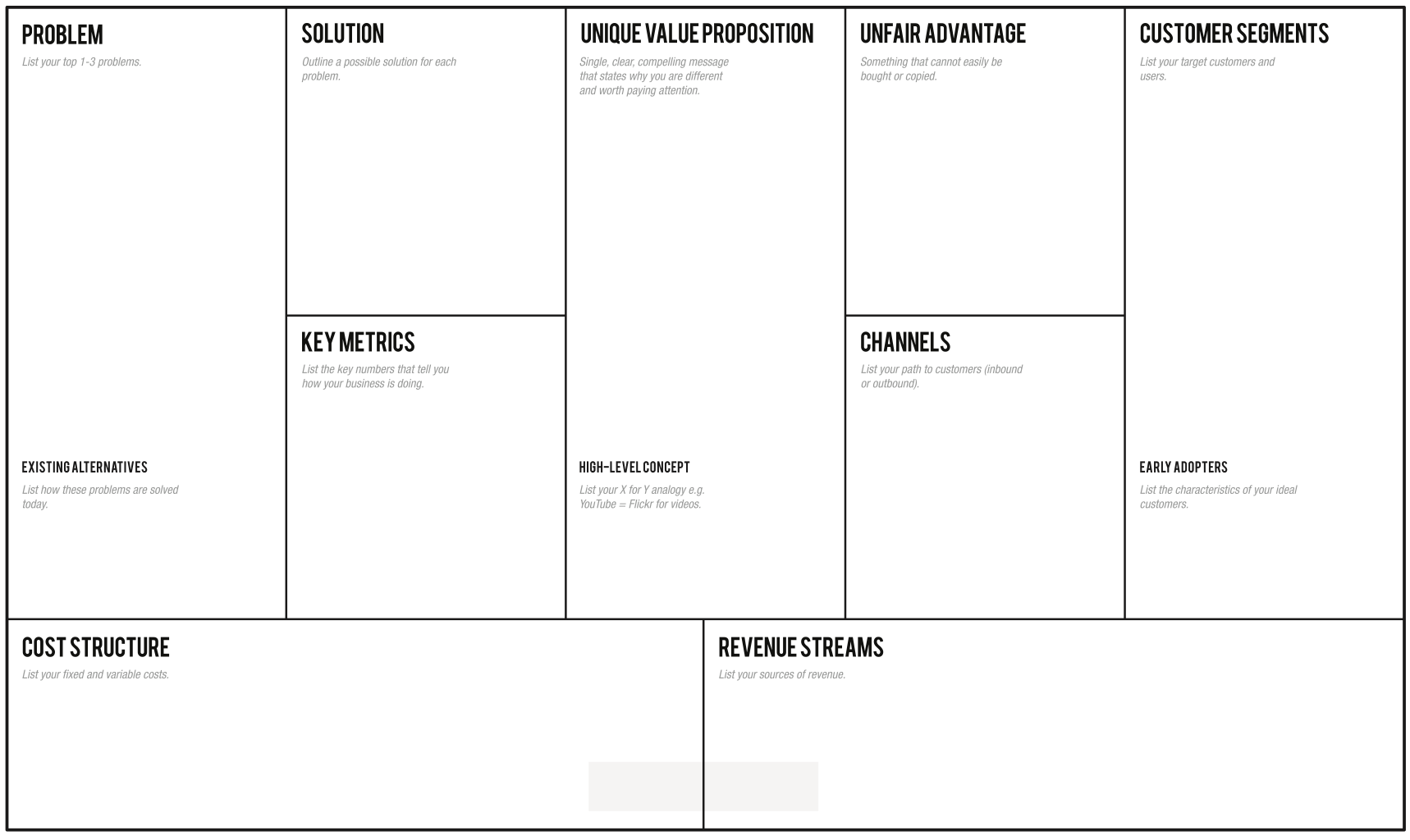
Product Conception – Bringing your business idea to life with the Lean CanvasIn this article we’re going to talk about product conception. We’re going to start with a broad overview of what a viable product idea needs. Then we’ll cover the process — the steps you need to take, the information you need to uncover — to complete your product conception. We’ll use the Lean Canvas for this. The Lean Canvas is a top level summary of your idea that will serve as your blueprint as you move onto the next stage, prototyping.
Why are we qualified to talk about product conception? Experience. Since SoftwareSeni started in 2013 we have taken dozens of businesses from initial idea to launch. We know the blindspots. We know your market isn’t “everyone”. We know how to dig to the core of your idea.
That digging is what this article is about.
The difference between a Good Idea and a Bad Idea
The best ideas come from insiders. People with years of experience and a detailed knowledge of a particular market. Maybe that’s you. Perhaps you’ve seen a pain point being ignored, a gap in the market, or an even larger, more radical opportunity.
This recognition of a real world problem that is calling out to be solved is the first sign you are onto a good idea. Bad ideas tend to be solutions to problems no-one has or no-one is willing to pay to fix.
Good ideas often arrive along with a vision for how to solve the problem. This vision is the start of the product conception.
As a vision, the solution is exciting, inspiring and rich with promise. It’s all three that drive businesses forward. But at this early stage, before vision has met reality, you already need to be prepared for it to grow and change.
It’s not the best quote, but “No plan survives contact with the enemy” is the most relevant. We can paraphrase it as “No business idea survives contact with the market”. At SoftwareSeni, we find it’s the teams that can adapt as they learn more about the intersection of their idea with the market that finish with the best results.
How to explore that intersection between your idea and the potential market, what you need to do and learn, can be a mystery if you’ve never attempted it before. Luckily, there’s a framework that provides a clear guide — the Lean Canvas.
Uncovering your blindspots with the Lean Canvas
Filling out a Lean Canvas will help direct your research and your thinking. It’s not the only way to conceptualise a product, but it’s easy to implement and it’s effective.
The outcome of completing the Lean Canvas is a clear understanding of your product and the business you are going to build around it. It is the necessary input and foundation for your prototype.
Let’s run through the sections of the Lean Canvas.
Problems and Solutions
Problems are the pain points you’ve recognised. If you’re diligent you’ve already confirmed they are actual pain points your potential customers have and are willing to pay to fix.
You might be thinking there’s not much space to write these things down. That’s the plan. You want to be concise and clear. It is a communication tool as much as it is a planning tool.
Key metrics and Unique Value Proposition
How are you going to measure progress and success? If you’re a start-up or a scale-up you might be focused on growth and interested in your DAU/MAU ratio or your churn rate. Perhaps you’re also focused on optimising your funnel and you want to track your Cart Conversion ratio. Write them all down.
Your Unique Value Proposition (UVP) is why people should choose you over the market incumbents. Is your UVP viable? Is it valuable? To your users? Is it compelling? Is it new? (Is it just another way to say Unique Selling Proposition?)
High Level Concept
This is the classic “Uber for X” statement. A single, short sentence that communicates what your product is about. Is it Facebook for pets? A concierge for cosmetic surgery? Craigslist for Gamers? AirBnb for medical tourists? A marketplace for pig breeders?
You want a statement here of such clarity that whoever hears it will grasp immediately how your product will work and who will use it.
Unfair advantage
This is a factor that your competitors will find difficult or impossible to replicate. It could be that you’re first in the market. Or your team has cornered the expertise needed. Maybe it’s personal — you’ve built up a community that is eager for your product. Perhaps you have a gun team that can out-manoeuvre the competition.
The bottom line is you want something to protect you from the competition. Once your app goes public and your success becomes apparent competitors will rush in.
Channels, customer segments and early adopters
You need to know where and how you’re going to reach your users. You need to know who they are and what their story is. Key amongst your customers are the early adopters. These could be the users who are simply more inquisitive, more adventurous, or the users who are desperate for a product that will solve their problems. Knowing who they are is the first step to working out how to reach them.
Cost structure and Revenue Streams
The outs and ins of your business model. The cost structure here is of course your initial cost structure. In the beginning it can be the right thing to use strategies that don’t scale. Throwing money at street teams when you launch might be the most effective growth accelerator for you.
The Revenue Stream box is where you lay out how your product is going to earn its money. It could be sales, subscriptions, transaction fees, etc. Don’t have a revenue stream? Congratulations, if you can keep growing fast enough after you go live you might be declared a unicorn, pivot a few times, and back into an IPO via a SPAC before starting your own angel investment firm.
On a serious note, these two boxes will feed back into your Key Metrics. Make sure the relationship between them makes sense.
What it’s going to take to fill in your Lean Canvas

The key to filling out the Lean Canvas is interviewing your potential users. These initial interviews serve as a rough sample of your customer segment. The more users you talk to and the more that see the same problems you do, the more you can be sure you’re on the right track. But the truth is in the numbers. Talk to 5 potential customers and 3 agree? You might be onto something. Talk to 10 more and find no further agreement? You’re starting to get a feel for how pervasive your problem really is, or is not.
An initial online survey can help here. It’s faster than conducting 100 interviews and the Lean Methodology is all about speed. As a first step it can help you confirm interest level and even refine your market segment.
The final output – ready for prototyping
Coming out of this process, completing your Lean Canvas, your moment of inspiration has been tested, improved, focused. You had an idea and now you have a product concept you can clearly communicate to others — your team, your customers, your potential investors.
With a solid product concept you’re ready for the next stage — prototyping. Read an introduction to prototyping your app here.
Until then, if you have a product concept you want to take to the next level, get in touch. We’d love to talk about it with you.
(You can also start your lean canvas right now by clicking here.)