This is a top-level guide to integrating payments using Stripe, PayPal, or Square. We don’t know anything about your site, so we will be sticking to giving you a backgrounder on the three platforms, an overview of what is involved in the integration, and where to find the information you need.
You don’t need to be a developer to benefit from this article. If you’re running a team, or just trying to get ChatGPT, Claude or Gemini to do this for you, it will help you ask the right questions and point your developers, or AI, in the right direction.
Implementation Planning And Requirements
When it comes to actually implementing a payment gateway, you’ve got options. Some providers give you a ready-to-go solution you can plug into your site with minimal fuss. Others need more work to integrate but let you customise everything about how payments work.
The timeline for getting up and running varies. The technical side – hooking everything up to your site – might only take hours depending on the solution you choose. But getting approved by your chosen payment provider can take longer. They all have their own requirements and approval processes you’ll need to satisfy. Make sure you factor both the technical integration and provider approval into your project timeline.
Comparing The Payment Platforms
Now let’s look at three payment providers. Each has its own approach to online payments that matches different business needs.
Stripe is built for developers. While it needs more setup work upfront, you get extensive customisation options.
PayPal takes a simpler path – they know their brand recognition helps sell your customers on trusting the checkout process. They back this up with multiple support channels from live chat to community forums.
Square sits somewhere in between. They started with point-of-sale systems for physical stores but have grown into providing solid online payment solutions. Think of them as the middle ground between Stripe’s technical depth and PayPal’s ease of use along with additional features aimed specifically at businesses with physical inventory.
Your choice comes down to what matters most for your business – pricing, technical resources, brand recognition, or your specific business model.
Technical Integration Fundamentals
Payment processing happens through APIs – programming interfaces that connect your site to payment providers. These APIs handle everything from validating cards to confirming transactions, but they need to be integrated properly.
When you’re choosing a payment solution, look at their development tools and documentation. These need to match your team’s skills.
Basic skills – there will be some code you can copy and paste into your website that provide you with basic payment features. Actual developer skills – you can build the payment flows that match your requirements.
They all allow you to test everything before going live. Payment providers give you sandbox environments where your team can experiment with different approaches without touching real money. This lets you work out any integration issues before customers start hitting that payment button.
Impact On Business Success
The payment system you choose and how you implement it affects every part of your business’s online transactions. Get it right and you build trust through familiar checkouts and reliable processing. Your customers complete more purchases and abandon fewer carts. Get it wrong – with slow processing, weird interfaces, or failed transactions – and you’ll see it directly in lost sales and unhappy customers.
This means the technical decisions around payments aren’t just about code and APIs, they are also about UX. This UX determines how smoothly your customers can give you money, which affects your revenue and growth. And this is why most websites build their own payment flow UX around APIs rather than drop-in buttons and code.
Building With Stripe
When it comes to building custom payment flows, Stripe’s platform really shines. Their API toolkit lets your development team build exactly what your business needs. Need usage-based billing? Want to handle payments between multiple parties? Stripe has you covered.
The developer-friendly approach means you’re not locked into a one-size-fits-all solution. You can create anything from a basic payment form to a full marketplace platform while keeping complete control over how your customers experience the checkout process. Plus, as your transaction volumes grow, Stripe’s platform handles the load without forcing you to re-architect your payment processing.
When it comes to actually implementing Stripe, you’ve got options. For businesses that need to get up and running quickly, their Checkout solution lets you drop payment forms into your site with minimal coding.
If you need complete control over how payments work in your product, Stripe’s APIs let you build exactly what you want. This means you can match your payment flow to your brand and business requirements. The trade-off is that you’ll need more development time, especially for features like discounts or coupons that require backend work.
Integrating PayPal Solutions
PayPal’s strength comes from being a household name in online payments. When customers see that PayPal button, they know exactly what they’re getting – a checkout process they trust. This brand recognition translates directly into completed sales.
What makes PayPal particularly attractive is how flexible their integration options are. Need to get up and running fast? Drop their pre-built buttons into your site with minimal coding. Want more control? PayPal’s REST APIs let you build custom payment flows that match your exact requirements.
This means your development team can choose the approach that fits your timeline and technical capabilities. Start simple with embedded buttons to test the market, then graduate to API integration when you need more sophisticated payment handling.
Let’s look at how PayPal’s integration actually works. The technical flow is straightforward – when someone clicks a checkout button on your site, the PayPal API kicks in to handle payment setup and launches their checkout interface right in the browser. While the interaction is simple, your developers still need to write the code that manages these steps and keeps everything running smoothly.
Before you can deploy anything live, you’ll need a PayPal Business Account. This gives you access to the API credentials your site needs to talk to PayPal. Their approach lets you get up and running quickly while keeping their security standards and that familiar checkout experience your customers trust.
PayPal’s platform is built around flexibility. You can start with their Smart Buttons – simple copy-paste components that need minimal development work. Just add some HTML and basic JavaScript event handling and you’re taking payments. This gets you to market fast while maintaining PayPal’s security standards and that checkout experience your customers know and trust.
Square Payment Solutions
Square has evolved well beyond its payment processing roots. They’ve built a comprehensive business platform that handles everything from inventory to analytics. This makes them particularly valuable if you’re running both physical and online stores since their APIs and development patterns work consistently across all sales channels.
Square’s e-commerce API provides a robust and flexible solution for integrating payments into your website. Their APIs and SDKs support various payment methods and can be customised to match your branding and checkout flow.
Their APIs handle secure payment processing, order management and inventory syncing. You can also leverage Square’s advanced fraud detection tools to protect your business and customers from unauthorised transactions.
Next Steps For Implementation
So what’s your next step? Get your development team started with the documentation that matches your choice. Each provider makes it easy to explore their platform before committing. Stripe’s developers can dive into their extensive API guides. If PayPal is your pick, their developer portal walks you through everything from basic buttons to custom integrations. Square keeps things straightforward with clear integration documentation that covers both online and in-person payments.
Start with sandbox testing. It lets you validate your integration approach without touching real money or real customers. Once you’re confident in your implementation strategy, build out a clear plan with your team. Remember – your payment provider choice sets the foundation for how your business handles money online. The sooner you start exploring these platforms, the sooner you’ll be processing real transactions.
Time to Get Your Payment System Rolling
Implementing online payments doesn’t have to be complex, but it does require careful consideration of your business needs and technical capabilities. Whether you choose Stripe’s developer-focused approach, PayPal’s brand recognition and simplicity, or Square’s unified commerce platform, success comes down to matching the provider’s strengths to your specific requirements. Go explore their documentation (and their pricing). The sooner you get started the sooner you start accepting payments.
Why You Should Be Devoting More Resources to UXInvesting in UX – User Experience – isn’t just about design—it’s about driving measurable business outcomes. Research shows 88 percent of online consumers are less likely to return to a site after a poor digital experience. This highlights how poor UX can directly impact customer retention and revenue. By prioritising UX, you can improve satisfaction, retention, and ultimately, your bottom line.
The consequences of poor UX extend beyond user frustration—they directly impact revenue. 70% of consumers have stopped using a brand due to poor customer experience, while 73% of business leaders confirm a direct link between customer service and company performance.
This data underscores a critical truth: neglecting UX doesn’t just annoy users—it drives them away, resulting in lost revenue and weakened customer loyalty. If you’re building a product around a web or mobile application, investing in UX isn’t optional—it’s essential for preventing these losses and ensuring long-term success.
Building User Centred Products
The difference between a successful app and one that users delete immediately comes down to its UX. If your app is to succeed, UX design must be a core part of your product strategy, not an afterthought.
Prioritising UX isn’t just about aesthetics—it’s about driving measurable business outcomes like customer satisfaction, which leads to retention, which results in revenue growth. All measurable.
The foundation of UX success lies in solving real user problems. A visually stunning app that lacks core functionality will be quickly abandoned because it fails to address user needs.
This highlights the importance of conducting user research to understand what problems users actually care about. There’s no point in building features or solving problems users don’t value (aka finding Product Market Fit). Great UX is all about delivering real value by solving the right problems for your users.
Many companies struggle to create effective UX, often because they fail to incorporate user feedback early or consistently. To address this, adopting the ‘build-measure-learn‘ approach allows you to continuously refine your product based on real user input.
By starting with interviewing users to understand their needs, then making it easy for users to provide feedback at each iteration of your design, you can ensure your product evolves to meet user needs, significantly reducing the risk of developing a solution that misses the mark.
Simplifying is Optimising for User Experience Design
High cognitive load—the mental effort required to use a product—ruins user experience. This is why “ease-of-use” is a key design goal.
When users feel overwhelmed by complex interfaces, they’re more likely to abandon apps or websites. To combat this, focus on reducing cognitive load by simplifying design and interactions. This means:
- avoiding information overload (simple screens),
- using familiar interactive elements (don’t be too clever),
- streamlining common tasks, and
- ensuring messages are clear and descriptive
The result is a smoother, more intuitive experience that boosts user satisfaction and increases retention—critical metrics for product success.
What do these kinds of changes look like?
- Providing real-time feedback during interactions
- Reducing typing requirements with autocomplete or drop-downs.
- Using visual weight to guide users’ attention to what matters most.
- Implementing inline validation for forms and inputs to prevent errors before they happen
These basic techniques are just to get you thinking. UX is a deep practice with lots of nuance.
The key take away is that by making interactions as close to effortless as you can (think swiping right on Tinder), you create a smoother, more intuitive experience that keeps users engaged and drives measurable results.
Performance and Loading Optimisation
Performance is the technical side of UX. Response time in a web application, in any application, is a major UX factor that impacts user satisfaction.
Jakob Nielsen’s research outlines three response-time limits:
- 0.1 seconds for an instantaneous feel,
- 1 second to maintain seamless thought flow, and
- 10 seconds is the upper limit for user attention.
Meeting those first 2 limits ensures users stay engaged and reduces frustration and abandonment. Prioritising performance in UX design is essential for creating a smooth, intuitive experience that drives conversions and retention.
This is very much about software architecture and devops – how the software behind your product is designed and the resources you can afford to run it. It’s a very technical subject and well beyond the scope of this article.
However, you can see how your site is performing using a tool like Google Pagespeed Insights that will show you where bottlenecks are and you can start discussing how to resolve them with your team.
UX Tools and Implementation
Companies that invest in UX see measurable benefits across both customer satisfaction and operational efficiency. A prime example is Easyjet, which tackled the common stressors of air travel by redesigning their app and in-airport check-in process to make it more pleasant and efficient.
This UX-focused approach not only improved customer satisfaction but also streamlined operations, demonstrating the tangible business value of investing in user experience. It also shows that UX extends beyond the browser into real world interactions with your company and your brand.
To deliver exceptional UX, your team will need the right tools for the job. For user research, survey tools like Typeform and Google Forms can be used to gather insights directly from your target audience.
When it’s time to map out user flows and brainstorm ideas, whiteboarding applications such as Miro and Whimsical enable collaborative design thinking.
And when it comes to bringing interfaces to life, design and prototyping tools like Figma, Sketch, and Marvel let you create interactive prototypes for stakeholder feedback and usability testing. Having the right tools in place is essential for translating UX strategy into tangible results.
Moving Forward On UX
Investing in UX isn’t just about making your web application look better – it’s about driving measurable business outcomes through improved user satisfaction, increased retention, and higher conversion rates.
The best time to start is today. Begin by assessing your current web application against the UX principles we’ve covered and have a look at your major pages using the page speed tool. Map out your user journeys, measure your loading times, and gather feedback from actual users. Whether you choose to build an in-house UX team or work with external experts, making UX a core part of your development process will help ensure your product doesn’t just work well, but delivers experiences that keep users coming back.
How To Make Distributed Agile Development Work For Your TeamAgile development grew out of teams working together in the same physical space. The original vision was all about standing around Kanban boards, having quick chats at desks, and gathering for daily standups in meeting rooms.
But, that’s not how most businesses operate today.
Teams are now distributed across cities, countries and time zones, collaborating through screens rather than in person. This creates real challenges when you try to implement Agile practices. Things like pair programming, sprint planning, and retrospectives become logistically complex when your team spans multiple time zones. You can’t just tap someone on the shoulder for a quick chat anymore.
The stakes are high here – poor implementation of distributed Agile leads to communication breakdowns, missed deadlines, and team friction.
But there’s good news. With the right combination of tools, processes and leadership strategies, you can capture all the benefits of Agile while embracing a distributed model.
Let’s look at the four main challenges that can derail distributed Agile projects, even with careful planning. Time zones are the obvious one – they make it hard to schedule those essential Agile ceremonies like sprint planning and daily standups that work best when everyone’s online together. Then there’s team bonding. Without casual chats in the kitchen or quick desk drop-bys, you lose those natural moments that build the trust needed for effective pair programming and problem-solving.
The other big issues are cultural and temporal. When you’ve got developers spread across different locations, you often end up with varying interpretations of Agile practices and principles. And with limited overlap in working hours, you miss out on those quick real-time collaborations that make rapid iteration possible. These challenges might seem overwhelming, but once you understand them, you can start putting solutions in place that keep the core benefits of Agile intact.
Core Strategies For Distributed Agile Success
The good news is that successful distributed Agile comes down to two key approaches that solve multiple challenges at once.
First, if you can, organise your teams as self-contained units by location, with each office, and sub-teams within each office, handling specific technology components from start to finish. This minimises time zone headaches while keeping the core Agile benefits of team autonomy and quick iteration cycles.
The second approach focuses on building those essential team connections through regular informal catch-ups. Set up weekly one-on-one video chats between team members in different locations. These casual knowledge-sharing sessions help bridge cultural differences and create the kind of team bonding that usually happens naturally when everyone’s in the same office.
With these foundations in place, you can focus on the operational practices that make distributed Agile work day-to-day.
We’ve found four key practices that consistently deliver results:
First, over-communicate decisions through multiple channels. Use team chat for immediate updates, follow up with email summaries, and record key meetings. This ensures everyone stays aligned regardless of their time zone.
Second, remove friction from your development environment. Automate provisioning where possible and maintain detailed documentation. The goal is to make it easy for any team member to get up and running quickly, without waiting for someone in another time zone to help.
Third, maintain crystal-clear definitions of ‘done’ that specify review requirements for each time zone involved. This prevents the ‘it’s finished but needs review from Singapore’ problem that can stall progress.
Finally, establish detailed guidelines for bug reports using standardised templates. When communication happens across time zones, you need to get it right the first time. These practices support both your modular team structure and cross-location communication by creating consistent expectations for everyone involved.
Managing Time Zone Differences
Time management sits at the heart of successful distributed Agile. Those overlapping work hours between teams – what we like to call ‘golden hours’ – are your most valuable resource for maintaining the collaborative spirit that makes Agile work.
Use these windows strategically. Focus them on activities that truly need real-time interaction, like pair programming and working through complex technical challenges together.
Be smart about scheduling your regular ceremonies too. Nobody wants to be the team that’s always dialling in at 6am or 11pm for standups. Set up a rotating schedule for daily meetings that spreads the time zone burden fairly across all your regional teams. When teams feel the schedule respects their work-life balance, they’re more likely to stay engaged and contribute meaningfully during those vital collaborative sessions.
Technical Infrastructure Requirements
Of course, all these practices need to be supported by solid technical infrastructure. Every team member needs more than just basic remote work tools – they need enterprise-grade setups that can handle Agile collaboration. This means investing in high-speed internet that won’t drop during critical pair programming sessions or sprint reviews, and ensuring everyone has hardware that can juggle development environments alongside video calls without lagging.
The virtual meeting spaces themselves deserve special attention. Basic video chat won’t cut it – you need platforms that support proper breakout sessions for sprint teams and collaborative tools for design work. Whether you go with Zoom, Teams, or Meet isn’t as important as making sure every team member, regardless of location, has equal access to these resources. When everyone’s working with the same robust toolkit, those time zone gaps start feeling a lot smaller.
Building Team Cohesion Remotely
But technology alone won’t build the team cohesion that drives effective collaboration. Remote teams need structured ways to develop the trust and rapport that normally comes from chatting in the office kitchen or grabbing coffee together.
This is where regular virtual team building becomes essential. Set up monthly or bi-weekly activities that bring people together across time zones. Online escape rooms get teams solving problems together. Virtual workshops let team members share their skills and interests. Remote team lunches create space for those casual conversations that build understanding. Even simple things like step-counting competitions or collaborative coding challenges help create connections between offices.
These activities aren’t just nice-to-haves. They directly support Agile principles by strengthening communication channels and fostering the mutual understanding needed for effective pair programming and sprint collaboration. When teams know and trust each other, those video call collaborations become much more productive.
Adapting Agile Ceremonies For Remote Teams
Now let’s look at how traditional Agile practices need to adapt when your team is distributed. The reality is that physical separation means you can’t run ceremonies and processes the same way you would in an office. You need thoughtful modifications to maintain their effectiveness.
This starts with adjusting your scrum ceremonies to work across time zones and reimagining how breakout sessions function in a virtual environment. You’ll also need additional communication structures to replace those quick desk-side chats, along with better documentation of decisions and cleaner, more frequently updated backlogs.
These tweaks ensure your distributed teams can keep the rapid iteration and collaboration that makes Agile work. They set the foundation for the specific implementation strategies we’ll explore next.
Running Effective Remote Daily Standups
The daily standup sits at the heart of Agile’s communication approach. Getting it right in a distributed environment means choosing the right tools and setting clear expectations. Video platforms like Zoom and Meet provide what you need – reliable video to keep people engaged, screen sharing for walking through sprint boards, and recording features for team members who can’t make it.
But tools alone aren’t enough. You need protocols that work across time zones. Schedule standups in those golden hours when most of the team can join live. Make cameras-on the default to maintain engagement. Use screen sharing deliberately – walk through your Jira or Trello boards as a team. And make sure recordings automatically land in your team chat platform for anyone who missed the live session.
When you combine solid tools with clear processes, your distributed standups maintain their role as those essential daily alignment sessions that keep everyone moving in the same direction.
Asynchronous Standups
For teams spread across vastly different time zones, traditional video standups can become more burden than benefit. That’s where asynchronous standup tools that integrate with Slack come in. These tools maintain the core value of daily updates while eliminating those painful scheduling compromises.
Tools like Geekbot handle the heavy lifting by automatically collecting updates from team members at times that work for their local schedule. Each person gets prompted to answer those essential standup questions – what they accomplished yesterday, what they’re tackling today, and any blockers they’re facing. These updates get collected and shared in a dedicated Slack channel where the whole team can review and respond to issues that need attention.
This approach lets you preserve the collaborative spirit of standups while respecting everyone’s work-life balance. Since it’s automated, you can fine-tune the questions and timing to match your team’s specific needs and Agile workflow. It’s a simple solution that keeps information flowing without forcing anyone to join calls at unreasonable hours.
Project Management Tools For Distributed Teams
Of course, making all these Agile adaptations work smoothly requires the right tools. For distributed teams, Jira stands out as the go-to solution. It gives you Scrum and Kanban boards that just work, while letting you set up custom workflows that match how your remote teams actually collaborate. When you’ve got developers spread across different time zones, Jira’s dependency tracking becomes essential – it helps everyone understand how their work fits together even when they can’t chat face to face.
What makes Jira particularly valuable for distributed teams is how it lets you enforce consistency. You can set up ticket completion rules that work the same way whether someone’s in London, Singapore or San Francisco. This creates the structured foundation remote teams need. But remember – while good tools are crucial, they’re just one piece of the distributed Agile puzzle.
If Jira feels like overkill for your needs, take a look at Trello. It’s a simpler option that works well for distributed teams of 10 or fewer developers. The interface is clean and intuitive – new team members can usually pick it up without formal training.
Trello’s free version gives you the essentials for Agile workflows – boards, lists and cards that help track work across locations. Paid tiers add automation and integrations if you need them. The real benefit is that Trello stays out of your way. Your team can focus on development rather than wrestling with complex project management features. Just keep in mind that you won’t get the deep dependency tracking or workflow customisation that makes Jira valuable for larger distributed teams.
Establishing Team Working Agreements
Beyond just tools and ceremonies, your distributed Agile teams need clear ground rules. A team agreement creates the foundation for smooth collaboration across time zones. Think of it as your playbook for remote work – it needs to cover five key areas.
First up is communication. Spell out which channels to use and when. Quick questions go to Slack, formal decisions need email trails.
Next, document how your team uses its tech stack. When everyone follows the same practices, you avoid those ‘works on my machine’ moments.
The agreement also needs to set expectations around sharing information. Critical knowledge can’t get trapped in one time zone.
Finally, address the practical stuff – security requirements for handling sensitive data remotely and response time standards. How long should someone wait for an answer?
Having these guidelines in place prevents the misunderstandings that trip up remote teams while creating the shared understanding that makes daily collaboration work.
Optimising Sprint Length For Remote Teams
Sprint length is one of those foundational decisions that can make or break your distributed Agile practice. While two-week sprints are common for co-located teams, distributed teams need to think carefully about what works best across time zones.
The sweet spot usually falls somewhere between one and four weeks. Longer sprints give you breathing room to coordinate across different regions and cut down on those tricky timezone-spanning ceremonies like planning and retros.
But there’s a trade-off – the longer your sprints, the more complex your planning becomes and the slower your feedback loops get running. Finding the right balance means understanding how your specific team collaborates remotely and what cadence keeps everyone moving forward effectively.
Short sprints add extra complexity when your team is distributed. You need a well-organised backlog that accounts for the realities of coordinating work across time zones. This means breaking down tasks in detail and being realistic about timing – what takes two hours when people are in the same room often needs double that when you’re coordinating across continents.
The key is setting up estimation practices that reflect both technical complexity and remote collaboration overhead. Daily backlog grooming becomes essential, with crystal clear priorities and detailed acceptance criteria to prevent confusion. When you’re working in compressed sprints, there’s no room for misalignment between teams in different locations.
Making Distributed Agile Work For Your Team
Distributed Agile development brings unique challenges, but with the right combination of tools, processes and team agreements, you can maintain the speed and collaboration that makes Agile effective. The key is being intentional about how you structure teams across locations, choosing the right technical infrastructure, and creating clear protocols for communication and ceremonies. When you get these elements right, distributed teams can be just as effective as co-located ones – sometimes even more so, since they’re forced to be explicit about processes that often remain informal in traditional settings.
If you’re leading a distributed Agile team right now, start by reviewing your current setup against the strategies we’ve covered. Pick one area – maybe it’s your standup format or your sprint length – and experiment with adjustments that better fit your team’s distribution. Small, iterative improvements to how your team works remotely will compound over time, leading to smoother collaboration and more predictable delivery.
And that’s what Agile is all about.
How you, a non-technical founder, can hire a development team to build your dream productYou’ve got a great idea for a software product. Maybe it’s an app, maybe it’s a website. But you don’t know the first thing about coding.
You’re not the first to face this problem.
We’ll walk you through a common sense process for hiring a software development team when you don’t have a technical background. We’ll focus on practical steps, easy to use tools, and clear communication strategies to help you turn your vision into a real, shipping product without doing any coding yourself.
Know your product
To keep things simple we’re going to assume your dream product is a SaaS that is going to launch on the web, but its website is going to be designed “mobile-first” to maximise reach. This also means that it will be easier to create a dedicated app in the future because you’ll have already done some of the design work.
Your first mission is to know your product. You need to know who it is for and what problem it solves and that the intended audience is willing to pay for it. You can find most of that out by talking to a few of your potential customers.
Know your competitors
You might have already taken this step. Your knowledge of the competition, or lack thereof, might be the very reason you came up with the idea.
Either way, you should research the competition. Google can help with that, but so can sites like G2 and Capterra. You want to identify your competitors’ target market, their USP, and their feature sets. Use that information to verify your own features and start drafting your own USP.
You may want to go so far as to sign up for free trials and see how the competition works, while also taking screenshots of feature implementations that you like or want to avoid.
Know your features
You’re not a coder. You might also not be a graphic designer or a UX designer. But you have used a lot of websites, a lot of SaaS, and in your competitor research you should have become quite familiar with what similar products are doing.
This is where you need to start laying out how your service will work. If this is something you’ve never done before you should start with AI-assisted tools like Creatie or UIzard. If you have some experience you might use Figma instead and draw out pages and interactive elements manually. Don’t forget you’re designing “mobile first”.
You want to end up with clearly defined flows for getting users logged in and flows for how they access and interact with your product’s features.
Understand the big picture
A service offered via a website is more than just a few web pages. Your product will also interact with a range of 3rd party services depending on what you choose to build and run yourself versus what you defer to someone else (like payments).
Using 3rd party services is an effective strategy to reduce development time, but you will need to keep an eye on costs. So, launch with these kinds of services supporting your product, then look at which ones you can replace with inhouse solutions later down the line if it makes sense.
Here are the main services your SaaS is likely to use:
- Cloud hosting. Most likely AWS. Many other hosting providers build on top of AWS and add $$$ to the cost
- Authentication. It should be as easy as possible for users/customers to sign up and sign in. You don’t want to build this yourself. Read more about authentication here to understand why.
- Payments. You can’t do this yourself. The big ones are Stripe, Square and PayPal.
- Database. You might rely on AWS’s solutions or need to use a service like Firebase or Supabase.
- Customer Support. Checkout Zendesk, Freshdesk and Intercom to see which has the features you think you’ll need once you have enough users to worry about.
You can use services like StackShare and BuiltWith to research your competitors or similar sites and see what their tech stack looks like. You will find all kinds of new things to read about. We also have an article about some services that can cut months off your runway.
Find your team
This is where our bias starts to show. And our pitch kind of starts.
There are different paths to hiring a team of developers. You can assemble a ragtag team of Fiverr and Upwork freelancers, but that does require the experience to judge the abilities of your candidates and the ability (and patience) to manage a dispersed team that might end up spanning multiple timezones. This can work.
A better path (we believe) is to hire your development team from a software development team extension provider like SoftwareSeni. It doesn’t have to be SoftwareSeni, but you want someone like SoftwareSeni. We have a major advantage that helps our Australian clients – our development team is based in Indonesia. This creates a large timezone overlap, making meetings, shared working hours, and communication in general easy to schedule.
Now, this service, this style of hiring developers to work on your product, is called a team extension because your team of one (or two) is being extended. It’s not a separate team, it’s not an agency you communicate with via an account manager – it is your team that you manage on day-to-day basis.
Why we recommend this option for non-technical founders is because it comes with multiple layers of support.
The support inherent in a software development team extension
Unlike hiring remote developers off of Fiverr or Upwork, everyone on your team extension works together in the same location with a complete set of support staff. This means things like HR, training, performance management, etc are being handled for you.
And, speaking for SoftwareSeni, you also get a dedicated project manager to help you plan and navigate each stage of the software development process. Your idea might be your first product. It isn’t theirs.
The result is a multi-level team dedicated to the success of your product. This doesn’t mean it’s going to be quick, easy or straightforward – building software never is – but it does mean you will be avoiding the headaches and downsides of working with multiple freelancers.
Finding your software development team provider
Google is your friend here. Find providers. Reach out to them and find out what products have they built that are similar to yours in terms of tech and features. You want to find providers with teams that have worked on similar projects.
Talk to them about your product. Ask them how their teams would build it and how they would run it once it was launched. Ask them about recommended team composition, rough timelines (never rely on these timelines, this is more for comparison between providers) and cost estimates.
The classic “joke” is that software development can be fast, cheap and good, but you only get to choose two. Those three numbers are mostly based on team size, and team size is the major variable you have control over. It will affect your budget and your timeline.
Choosing your team members
Once you have chosen your provider the next step is to choose your team members. Since you’re non-technical, the best advice is to go for as much experience as you can afford with programmers who have implemented similar features (and tech stacks – don’t let buttons and menus make you forget about servers and payment gateways). Your provider can help you with that.
Make sure you have provisions in your contract with your provider for swapping out developers who aren’t contributing satisfactorily. This mismatch is normally clear early on and as a result these provisions often expire after a few weeks. Your needs/cashflow might also change so maintain clear communication with your provider so you don’t surprise them with requests to upsize or downsize your team that fall outside your contract.
Please note that the developers you hire are still autonomous individuals, much like any employee. They are not bound by law to you or your project and managing them needs to be done with the same care and consideration you would manage any team. This does need to be pointed out to some people.
Managing your team
This is too big a topic for this article. Or any single article. You will be simultaneously managing a team and a software development project. If you can break up big ideas into small steps, can be patient in the face of the frustrations of software development, and can handle a stream of video calls, Slack messages and emails, you will work it out.
Remember – you’ll be working with experts who are all focused on the success of your project.
What are you waiting for?
You’ve got the big idea. Start making it happen. Work through the steps in this article. They’ll take time, but you will learn new things at every stage that will make each following step easier.
And if you want to chat about your idea and how it might be implemented, we love talking about this stuff. Get in contact with us for a chat.
Enterprise 6X-ed AI spend so here’s what to build and how to sell to themMenlo Ventures just released an interesting report on The State of Generative AI in the Enterprise. The stand out number is that the enterprise market went from spending $2.3B on generative AI in 2023 to $13.8B in 2024 – an over 6x increase in a single year.
With enterprise embracing products built around AI, if you’ve been sitting on a product idea now is the time to jump into the market.
We’ll give you a quick run through on where enterprise is spending money on AI and follow that with the steps your Customer Success team will need to take to guarantee your customers embrace your product.
The AI-based products enterprise is spending money on
If you’re targeting the enterprise you have to ask yourself if you’re going cross-vertical or narrowing in on a specific vertical you have experience in.
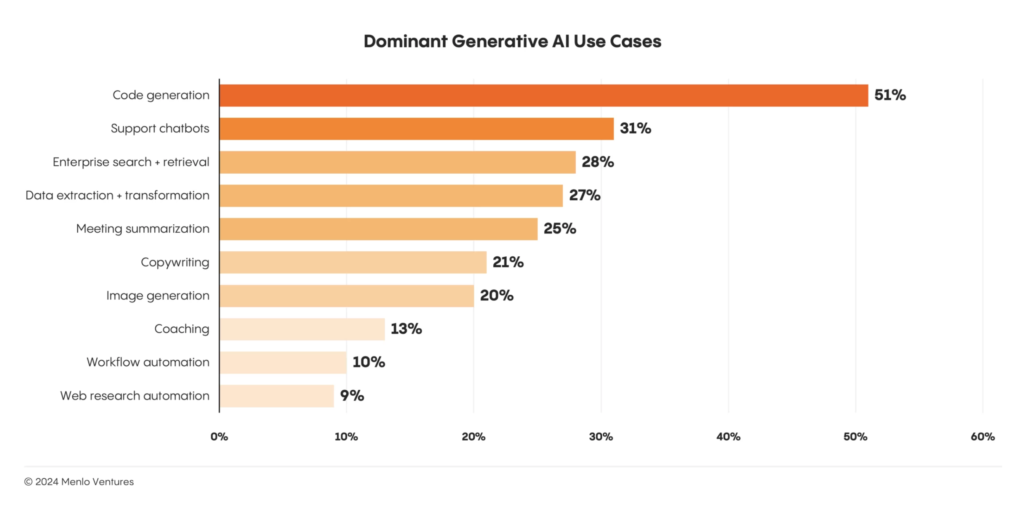
If you look at the chart above you can “see search and retrieval” as well as “Data extraction and transformation”. They are both broad use cases. Do you build a cross-vertical solution for those use cases, or do you say “Let’s extract this data in X vertical and transform it to do Y”? (Personally, we’d prove the tech in the vertical and then move into other verticals from there.)
Cross-Vertical Products
Some AI-based products are naturally cross-vertical. Businesses are all built on the same tech and share common processes. Being the preferred supplier for universal processes like “math” (looking at you, Excel), or “workflow optimisation” or “coding” opens up a huge potential market.
Some of these broad tools include:
- Coding assistants: Tools like GitHub Copilot and Codeium speed up the boring, and sometimes repetitive nuts-and-bolts of programming: test cases, boilerplate, and debugging. They can shorten development cycles and allow for more ambitious projects. It is no wonder they are becoming indispensable for IT and engineering teams in any industry. Given that you can fork an open source code editor like Visual Studio Code, add some interface logic and custom prompts to create your own coding assistant, it is no wonder options in this area keep growing.
- Support Chatbots: There are hundreds of players in the chatbot field. But enterprise has special needs and is demanding. Platforms like Aisera and Cognigy help enterprises automate customer service 24/7, and do it by offering scalable solutions and deep feature sets.
- Enterprise Search + Retrieval: Products like Glean enable semantic knowledge searches across internal documents, CRMs, Slack channels, Google documents, databases – all of an enterprise’s data. And these products provide the fine-grained data access permissions enterprise requires on top of secure and regulatory compliant indexing and ingestion. Permissions, security and compliance – they’re the big challenges. Once that is done these systems are still just chat interfaces to RAG systems with bespoke prompts and AI workflows.
- Data Extraction and Transformation: This is quite similar to 3, and in that way Sana offers similar features to Glean. Data extraction is a form of search and retrieval, but AI, via RAG (and sometimes combined with traditional search tech), brings new ways to search and filter unstructured data, or turn messy data, like scans of handwritten forms, into accessible structured data. This “new” or newly accessible data can then be fed into decision-making processes or further AI applications.
- Meeting Summarisation Tools: That this category, which is Text-to-speech with smarts, ranks so highly speaks to how much time is lost in meetings. Fireflies.ai and Otter.ai are examples of this category. Not only do these products save people time, the summarisations they produce can be fed back into the Enterprise Search and Retrieval tooling so answers and decisions are globally accessible.
Vertical-Specific Products
Cross-vertical tools are the general solutions – toolkits like Glean and Sana where the effort and expense is in security and making them available to an entire enterprise.
For verticals, the products are specialised versions of the general solutions. Here, you need to know the challenges, the data, the reports, and the processes of the vertical. If you can recognise where you can leverage AI and understand how to integrate it and how to convince the stakeholders to integrate it, you’re on your way to a successful product.
Here are some verticals and the kind of AI-based products finding success. Note – this is the US market, which is quite different to the Australian market in how industries like healthcare and financial services operate. Also, all numbers are in $USD.
Healthcare ($500 million in AI enterprise spend):
- Ambient Scribes: Tools like Heidi or Eleos Health (or Lyrebird in Australia) automate medical documentation, reducing the administrative burden for healthcare practitioners.
- Clinical Lifecycle Automation: Solutions targeting triage, intake, coding, and revenue cycle management streamline intricate processes unique to healthcare workflows.
Legal ($350 million in AI enterprise spend):
- Contract Analysis Tools: Products like Harvey provide AI-assisted legal research, let lawyers “query” documents instead of scanning through them, assist in contract drafting much like they do in coding – filling in boilerplate, catching simple errors and types, and some forms of analysis.
- Litigation Support: Platforms such as Everlaw add AI-based search and retrieval to e-discovery processes and speed up trial preparation.
Financial Services ($100 million in AI enterprise spend):
- Risk Assessment and Compliance Tools: Products like Greenlite provide real-time compliance monitoring, while tools like Arkifi use LLMs to accelerate financial research.
- Back Office Automation: Solutions that automate complex reconciliation and reporting workflows can transform accounting processes.
Choosing and Developing Your Product Strategy
Let’s look at one type of product—Enterprise Search + Retrieval. It’s a good place to start as most AI products are built around search and retrieval.
We’ll walk through what a startup creating such a product needs to undertake to ensure its successfully adopted by customers.
Ensuring Integration and Delivering ROI
Your Customer Success strategy needs to ensure that enterprises can integrate your product into their workflows while realising enough measurable value. Here, loosely, are the steps you’re going to need to take.
Step 1: Strategic Alignment and Goal Setting
Before implementation starts you need to work with customers to align your product with their strategic priorities. For an enterprise search product, consider the following actions:
- Identify specific pain points (e.g., fragmented search across emails, messengers, or document repositories).
- Define KPIs such as search accuracy improvement (e.g., from 60% to 90%), query response times (e.g., reducing average time from 10 seconds to 3 seconds), or overall employee productivity gains.
- Ensure stakeholders across IT, HR, and knowledge management buy into the solution’s potential impact.
Step 2: Baseline Assessment
Establish a clear baseline to measure improvements once your product is being used:
- Measure existing search query success rates (e.g., percentage of queries resolved on the first attempt).
- Assess the average time employees spend searching for information daily or weekly.
For example:
- Current query success rate: 60%
- Average weekly search time per employee: 5 hours
These metrics will serve as comparison points post-deployment.
Step 3: Pilot Testing with Focused Use Cases
Run a targeted pilot with a single department or team before rolling out your product enterprise-wide. Keep the scope manageable with focused use cases—for example, deploying within HR for talent management or within IT for knowledge-base retrievals.
Actions to take:
- Collect real-time feedback from users about usability and result quality.
- Begin quantifying benefits such as time savings in accessing key documents.
- Look at how they use it and if there are opportunities for new, specific queries to support their processes.
Step 4: Integration and Scalability Design
Successful generative AI tools must integrate smoothly with existing systems (like Slack, Google Drive, or Microsoft Teams) while maintaining scalability for future needs. Particular attention should be paid to data privacy compliance when dealing with sensitive internal information.
Strategies for success include:
- Partnering with IT stakeholders to ensure seamless integration into existing data sources.
- Creating onboarding documentation or customer training guides to help teams maximise adoption.
- Provide experienced technical support that can assist directly with the integration.
Step 5: Real-Time Monitoring and Iteration
Once your product moves into enterprise-wide use, monitor key metrics and track performance against the benchmarks established during the baseline assessment phase.
Iterate based on feedback by optimising features like query suggestions or integrating additional data sources.
Step 6: Qualitative Impact Assessment
Beyond quantitative metrics, gather qualitative feedback through surveys and interviews. Assess how your product affects employees’ ability to collaborate or make decisions faster based on relevant insights.
Use feedback to refine features and add context-specific improvements.
Step 7: ROI Reporting and Stakeholder Communication
As results accrue, create clear reports that quantify both tangible (e.g., time savings) and intangible (e.g., employee satisfaction) benefits. Focus on linking these metrics back to strategic goals identified earlier.
Example ROI Report Structure:
- Baseline Metrics: Itemize pre-launch performance (e.g., search accuracy at 60%).
- Post-Go-Live Impact: Document achievements (e.g., accuracy improvement to 90%, time savings worth $500K annually).
- Customer Testimonials: Include quotes demonstrating how employees value the tool’s impact on their work.
- Long-Term Predictions: Highlight how ongoing adjustments will deliver scaling advantages across departments.
Step 7 is obviously the most important step, but you should know around step 3 or 4 how you are tracking on delivering value. That will give you opportunities to find and implement the targeted features and applications on top of your product that will win you the customer.
Now is the best time to start building on AI
As generative AI gains momentum in enterprise operations, startups have the opportunity to become embedded within enterprise workflows as the essential solutions providers.
As a startup, you can capture this momentum by either developing wide-reaching cross-vertical products like enterprise search or by addressing industry-specific needs in the vertical of your choosing.
But building a great product is only the first step. Ensuring your enterprise customers realise its potential is where the growth is. Enterprise wants every step of the implementation process to be focusing on delivering value. By investing in Customer Success, and taking all the necessary steps to reduce risk, like pilot testing and monitoring, you can lock customers in and position yourself as the go-to for the market.
We love talking product development. If you want to chat about your product plans, or about how SoftwareSeni could help you execute on them, get in touch.
US PropTech funding trends vs the Australian marketFunding for proptech has seen declines both here and in the US. But over there a few sectors are seeing funding. Like Australia, the US is dealing with interest rates and a challenging housing market, so we share some commonalities and proptech success in the US might give some clues to what might attract interest here. However, there are some major structural and cultural differences which means not every US product is going to work locally.
The four proptech sectors finding funding in the US are home equity financing, rental management, eco-friendly building, and construction streamlining tools.
Let’s break down which of these ideas might work locally, and what problems they might encounter if they tried it out in Australia..
Home Equity and Alternative Financing
In the US, startups like Splitero and Unlock offer homeowners cash in exchange for a slice of their home’s future value. In Australia, this business model runs into some problems.
Our regulatory framework doesn’t clearly accommodate these arrangements. The National Consumer Credit Protection Act would likely classify such home equity agreements as credit products, meaning startups trying to introduce these models could face heavy compliance burdens and ASIC scrutiny. Moreover, Australian banks already offer competitive equity release options like reverse mortgages, so there’s an established marketplace that might not welcome disruption lightly.
EasyKnock‘s sale-leaseback financing model, where homeowners sell their homes but lease them back, isn’t straightforward here. Tax complications add layers of difficulty with capital gains tax and stamp duty. In addition, Australia’s state-based tenancy laws are complex, and implementing this model nationally would be exceedingly difficult. And culturally, selling a primary residence—even under such terms—doesn’t sit well with many Australians who are strongly attached to homeownership as a long-term investment.
Rental management is not simple here
With house prices pushing wanna-be buyers into the rental market—similar to trends in Australia—the US has seen funding flow into rental services aimed at streamlining both processes and rewards.
One example is Bilt Rewards, a platform that lets renters accumulate loyalty points for paying rent through a credit card. While this raised hundreds of millions of dollars in the US, trying it here would hit some snags. In Australia rent is typically paid via direct bank transfer, not through credit cards. This preference is ingrained in our rental systems, making it difficult to establish the widespread adoption needed to make rewards meaningful. Additionally, Australia’s smaller merchant network means such loyalty programs would provide fewer tangible benefits compared to the US.
Then there’s Rentberry, which helps tenants negotiate rent prices and lease terms. While rent negotiations might occur in certain overseas markets, Australian rental laws are strictly state-specific with regulated lease arrangements, leaving little room for negotiations on what are almost always pro forma documents with a few tweaks. In the current market there is also very little room to negotiate on price.
But behind the desk, EliseAI’s conversational AI for property management could work well here with the right localisation. Automation in property management has appeal in a market that values efficiency, especially with the high volume of rental properties.
Eco-Conscious Homebuilding and Energy Efficiency
The demand for sustainable construction solutions is global; however, this space brings its own set of challenges when scaling technologies across regulatory boundaries. Proptech founders might want to consider what is happening in the US as hints to what might work here.
In low-emission concrete, we’ve already started. Overseas startups like Sublime Systems and Fortera, both of which produce low-emission concrete, are gaining traction and the technology aligns strongly with Australia’s commitment to sustainability in construction. Our own low-emission concrete companies, Holcim and Zeobond, face a smaller market, which in turn means lower demand and lower funding levels. But also a stronger drive for efficiencies which might help set them up as global competitors.
Quilt—which make energy-efficient electric heat pumps—face market entry challenges due to Australia’s highly varied climate zones. Melbourne homes require vastly different heating systems than those in Brisbane or Perth, so a “one size fits all” solution may not fly. Entrenched competition from established HVAC manufacturers also adds complexity; there wouldn’t be much room for error when competing on product effectiveness.
Then there’s Quilt, which offers energy-efficient heat pumps with room-by-room temperature control. Heat pumps aren’t new in Australia, but building a product tailored to a particular market to capture increased margins is a strategy worth studying and adopting. Between rises in energy prices and ongoing impacts of climate change driving Australia’s climate extremes further apart, climate control is market with lots of growth ahead of it.
Approaching climate control from a different direction, companies like Sealed, which connects the dots between contractors, home/business owners and government energy efficiency programs. They aim to drive installation of insulation and weather-proofing to help customers reduce spend on utilities. This is an interesting model to draw inspiration from, one which solar installation has used, but one where Sealed is setting itself up to capture value in the programs by placing itself in the middle of the process. By acting as an orchestrator it ensures everyone wins, including Sealed.
Construction streamlining – our red tape is different to their red tape
Builders and developers in both Australia and the US face escalating costs and expanding project timelines—a pain point ripe for tech-led disruption.
In the US, startups like PermitFlow are tackling construction delays caused by permit processes—something that has universal appeal across markets. But here we have important differences: Australia’s planning permits are a patchwork system that varies significantly from state to state. For any company looking to streamline this part of the process in Australia, local requirements complicate national expansion.
Meanwhile, tools like HighArc’s homebuilding automation platform offer potential in automating aspects of construction planning and design. However, they would face similar hurdles complying with Australian building codes and dealing with our unique construction methodologies (which can differ from their US counterparts).
So what’s your idea
So in the US they have it easier for accessing equity in existing houses and doing tricky financing. Australia is much more conservative on that front. Same with our rental market. But while the transaction focused portion of Australian real estate doesn’t allow much room to add value, there are a vast amount of options around those transactions that need support and streamlining. EliseAI should face stiff competition from Australian entrants.
And if property transactions have opportunities for support, then construction is wide open. They don’t all need to be end-to-end products like HighArc. Not when they start out. Anything that helps tame the complexity of construction and also its intersection with permits and compliance and regulation is going to have legs.
It all comes down to not blindly replicating the business models of US startups, but using them as jumping off points to build a business that is designed from the bottom up to work with Australia’s unique conditions. And, you know, take over the world from there.
There’s a better way to spend your hiring budgetThere’s a better way to spend your hiring budget. This strategy is for those businesses that are building something new. A product that’s backend heavy. Maybe it’s AI. Maybe it’s fintech or healthtec or proptech.
It’s a simple strategy based on a simple insight – you want to hire the best people in the market you can afford to focus on doing the novel, hard work of turning your idea into reality.
Here is the game plan:
- Focus your hiring budget on backend expertise
- Consider no-code tools for your MVP
- Use a team extension for frontend development
- Scale up gradually with funding/revenue milestones
Let’s see how this might work out in practice using a fictional startup we’ll call SmartSpend. SmartSpend is planning to build an AI-powered personal finance service that analyses your spending patterns and generates personalised financial coaching.
The Core Technology Challenge
SmartSpend’s competitive advantage will be in their proprietary AI stack that will predict spending behaviours and provide actionable financial advice. Building the AI stack requires deep expertise in machine learning, AI, and financial data processing. This is where the founders want their best talent, preferably experienced engineers who’ve built similar systems before.
The user-facing part of SmartSpend – the web application – is an essential component, but unlike the backend, it is well understood. The interface needs to be polished and professional, but it will be built using established frameworks and patterns. We’re talking about standard authentication flows, common UI patterns for financial apps, and well-documented API integration approaches.
This is perfect territory for a team extension, where you can get qualified developers at a fraction of the cost of hiring internally.
The Smart Money Path
Here’s how SmartSpend could implement the game plan:
Phase 1: MVP with Core Focus
- Hire two senior ML engineers and a data scientist internally
- Build the core AI engine and API
- Use a low-code solution like Retool, WeWeb or FlutterFlow for the initial interface.
Phase 2: Post Initial Traction
- Keep core team focused on improving the AI engine
- Engage a team extension service for proper frontend development
- The two teams communicate but operate in parallel
- Team extension means you keep all product management in-house
Phase 3: Scale with Funding
- Expand internal AI/ML team
- Keep frontend development with team extension
- Add specialised internal hires for specific challenges
- Grow their team extension with devops roles
The Numbers Make Sense
Let’s break down a hypothetical budget for SmartSpend:
Internal Hires (Annual):
- Senior ML Engineer: $180,000 × 2
- Data Scientist: $150,000
Total: $510,000
Team Extension (Annual):
- 2 Frontend Developers: $60,000 × 2
Total: $120,000
The difference in cost between internal hires and a team extension leaves SmartSpend with more cash to protect their investment in the core team through bonuses, matching offers, etc.
Why This Works
This strategy works for SmartSpend because it concentrates resources where they matter most. Their core team focuses on the challenging aspects of their product – the AI models, data processing, and financial analysis algorithms. Meanwhile, the frontend development, which follows well-established patterns and practices, is handled cost-effectively through a team extension.
The approach also reduces risk through flexible scaling. You can start with a low-code solution to get your MVP out quickly, then transition to a custom frontend as you prove your market fit. Through the entire process you’re remaining competitive in the talent market while maintaining momentum.
Making It Work For You
This strategy isn’t one-size-fits-all, but it works well for businesses where the core value proposition relies on complex backend technology and the frontend needs are relatively standard. For SmartSpend, success depends on their AI models and financial analysis – not on reinventing how users interact with their data.
Start by identifying your core technical challenges and hire the best people you can find to solve them. Then, build around that core with flexible, cost-effective solutions for everything else. Remember, you’re not just saving money – you’re optimising your resources to give your business the best chance of success where it matters most.
If you like talking strategy or might be thinking about how a team extension could impact your business, get in touch. We love chatting about this stuff.
Keep your accounts under control – The simplest SOP to manage third party servicesHow many services does your business use? Marketing is using MailChimp and Hubspot, your devs are accessing paid APIs for AWS, search, AI, etc. HR is paying for job boards.
It’s a lot to keep track of and it is a pain when people leave or switch roles. So in this article we are going to give you the simplest process with the best ease-of-use and gives the quickest handovers of accounts.
It’s built on a central email address with per-service forwarding and a 2FA-for-teams product.
Let’s get into it.
1. Account Identity & Ownership
Business account ownership needs to remain with the company, not individuals. This starts with using company-controlled email addresses for all third party service accounts.
This means you need to appoint someone to handle these addresses. They’ll mainly be setting up email forwarding rules, but will need to be involved when a new service is onboarded or when employees managing the service leave or change roles.
A centralised email account
This process is based around a central email account. Call it something like [email protected]. This will be the primary contact for third party services (e.g., AWS, Google Workspace, etc.).
You may or may not want to use what is known as email sub-addressing or plus addressing when registering for new services. This is when you extend the name in your email address (services) with a ‘+’ and word, for example – [email protected].
Mail services recognise that the actual address is [email protected], but you get that little extra bit of information, +aws, to use in filtering and forwarding rules. Also, some services treat the entire name+thing as the entire email address, so you can often sign up for multiple accounts on the same service and just change what comes after the “+”. However some services ignore the “+…” to stop people from doing this.
Register for every 3rd party service with the central account
When it’s decided your business needs to use yet another service, perform the sign-up and registration using your [email protected] account, or with a [email protected] style email address.
Then use email forwarding from the centralised account
Once the new service is registered for using your centralised account, set up email forwarding rules to direct account notifications (like verification codes or security alerts) to the person who will be responsible for that service. For example, if Sarah manages AWS, forward [email protected] emails to her work email address – [email protected].
Here are instructions for forwarding emails using Microsoft Teams, and instructions for forwarding emails using Gmail in Google Workspace. If you haven’t used the [email protected] style email address you may need to inspect a few emails from the service to discover which source email addresses you need to match against and forward to the appropriate person.
Handover is easy
When Sarah leaves or changes roles, simply update the forwarding rule to send notifications to her replacement—no need to change the service account email itself.
Role-Based Emails
You can take this a step further and forward service messages to role-based email addresses such as [email protected] or [email protected]. This ensures that control resides with the department rather than an individual employee.
What about Single Sign On (SSO)?
While Single Sign-On (SSO) solutions like “Sign in with Google” make registering for new services quick and easy and secure, they also tie accounts to individual credentials, which creates all the complications around continuity we’re setting up this process to avoid.
2. Authentication Management: Handling 2FA
Two-factor authentication (2FA) – where a website might ask you to enter a special code from an authenticator app – adds an important layer of security. But 2FA can make using secure sites a frustrating exercise in co-ordination if you haven’t got everything set up properly.
However, as far as we can tell there is only one simple way to handle 2FA when there is more than one person involved – Daito.io. It’s a tool for managing 2FA for teams.
Daito.io allows you to link 2FA tokens to service accounts rather than individual employees’ personal devices.
It also lets you set up permission levels so only authorised users can access specific tokens, and enables you to back-up the “seeds” (the random secret key that 2FA authentication apps like Google Authenticator use to generate the time-limited codes used in 2FA) securely.
This means you can avoid reliance on phone based apps and the issues that arise when phones are lost or employees who own the phones leave suddenly.
A browser based tool does mean your password game needs to be on point if you’re going to keep it secure. Which brings us to the final step in the process.
3. Password Management
Your third party services have all been centralised under a single email address and a 2FA management tool. Now do the same for the passwords used with those third party services.
There are multiple business password managers out there for you if you’re not a giant enterprise – Bitwarden, 1Password Business, and Dashlane for Teams, for example. Choose one, use it. It’s that simple.
Putting it to work – performing a handover
The goal of this setup is to make handovers as painless as possible when employees leave or change roles.
Here are the handover steps:
- Update Email Forwards: For non-2FA accounts, simply update the forwarding rules on the central service email ([email protected]) so notifications go to the new owner.
- Adjust 2FA Access: For 2FA-protected accounts, update the access groups in your 2FA management tool. No need to manually transfer authenticator apps between devices.
- Revoke Password Access: Remove departing team members from your password manager while ensuring their replacement has access.
That’s nice and straightforward. Chances are the same person will be performing all those steps and they can probably perform them in under 10 minutes.
That’s all there is. Why not go do it?
By structuring your accounts with third party services around a single email address using a centralised 2FA solution, and employing a business-wide password manager for shared credentials, you make accessing, managing and transferring third party services quick and easy.
The setup requires a little upfront effort, and someone needs to be on point setting up forwards and managing passwords and roles, it simplifies handovers, it simplifies accessing third party services, and ensures you retain control over all the services your business relies on as your team inevitably grows and changes.
We’re all about smart processes and smart products. If you’d like to talk about working together on your product or expanding your development team, get in touch.
Metric of the moment – Sales Velocity, and how to use it to boost salesThere are so many metrics. Today we’re only going to look at Sales Velocity. We like this one because it’s not just the number that’s useful. The entire formula, short as it is, acts like a mini-guide to where you need to put your effort to boost sales.
Sales Velocity is typically used by companies with sales teams, but there’s an equivalent for self-serve B2B and B2C businesses as well – Revenue Velocity. We’re going to cover both and tell you how to use them.
What even is Sales Velocity and why should you care
Sales Velocity measures how quickly your business (or your sales team) generates revenue by doing math that focuses on the timing and effectiveness of your sales process. As you’ll see, the numbers tracked as part of Sales Velocity means you can use it to:
- Spot bottlenecks in your sales process
- Guide decisions on how to improve sales performance
- Improve revenue forecasts
This metric is particularly useful for B2B companies with longer sales cycles and higher deal values. There are also B2C businesses that can benefit from it, especially those with products or services that have higher ticket prices and longer consideration periods. Often these are businesses with a digital funnel but a very bricks-and-mortar product – renovations, kitchens, and custom furniture fit into this category.
How to calculate your Sales Velocity
Sales Velocity is calculated from four numbers:
- Number of Opportunities: All the deals in your pipeline for a given period.
- Average Deal Value: Total revenue divided by the number of closed deals.
- Win Rate: The percentage of deals you’ve won out of total opportunities.
- Length of Sales Cycle: The average time it takes to close a deal.
Here’s the formula:
Sales Velocity = (Number of Opportunities × Average Deal Value × Win Rate) ÷ Length of Sales Cycle
And here’s an example:
Let’s say last month you had 50 opportunities in your pipeline. Your average deal value was $5,000, your win rate was 20% (not bad), and the average length of your sales cycle was 30 days.
Sales Velocity = (50 × $5,000 × 0.2) ÷ 30 = $1,666.67
This means your sales process is generating $1,666.67 per day in revenue.
Making Sense of the Results
Once you’ve got your Sales Velocity, it’s time to interpret it. Don’t just look at the final number. It won’t mean anything on its own, but it will after a few months of tracking it. What you want to look at is all the numbers laid out in the formula.
A low number might point to specific issues:
- Low Win Rate? Your lead qualification might need work, or your sales team could use more training.
- Long Sales Cycle? Look for ways to streamline your process or implement some automation.
- Few Opportunities? It might be time to boost your marketing efforts.
- Low Average Deal Value? Consider upselling strategies or revisit your pricing.
You can’t improve what you don’t measure. Sales Velocity gives you four components – four numbers – you can work on improving. We can’t tell you which one to work on first. You know your business better than anyone.
Start with focusing on the component that will have the biggest impact on your Sales Velocity. Set clear goals and track your progress monthly. If you can’t move it, or it stops moving, look at your Sales Velocity equation again and pick the next component you can impact the most. Rinse and repeat.
Revenue Velocity: The Self-Serve Business Equivalent
For self-serve B2B SaaS or B2C e-commerce businesses, “Revenue Velocity” is the equivalent metric. It measures how quickly and efficiently you convert website visitors into paying customers.
The components are similar, but tailored to online businesses:
- Number of Transactions: Total purchases or signups in a given period
- Average Transaction Value: Total revenue divided by number of transactions
- Conversion Rate: Percentage of visitors who make a purchase
- Time to Purchase: Average time from first interaction to purchase
The formula looks like this:
Revenue Velocity = (Number of Transactions × Average Transaction Value × Conversion Rate) ÷ Time to Purchase
Example: Let’s say last month you had 200 transactions with an average value of $100 each. Your conversion rate was 5%, and it took customers an average of 7 days from their first interaction to purchase:
Revenue Velocity = (200 × $100 × 0.05) ÷ 7 = $142.86
This means your self-serve business generated $142.86 per day in revenue from transactions.
To calculate it, you’ll need to dig into your web analytics and e-commerce platform data. Tools like Google Analytics, combined with your e-commerce platform’s reporting features, can provide most of this information.
Interpreting Revenue Velocity
Just like Sales Velocity, Revenue Velocity gives you four numbers you can work on to improve your sales.
For example, you can:
- Increase traffic through SEO and PPC advertising to boost the number of transactions.
- Optimise your pricing strategy or introduce upsells to improve average transaction value.
- Look at how users interact with your site and run A/B tests to find ways to increase conversation rates
- Use retargeting to reduce the time to purchase.
You will know best what resources you have available and which components will give you the best return on your efforts. Then it’s just a matter of monitoring your progress and moving onto the next component once the gains slow.
The standard “Make numbers go up” process
Whether you’re using Sales Velocity or Revenue Velocity, these metrics can help you select and monitor the facet of your sales process that will give you the biggest boost.
While we’ve already discussed the process (twice), here’s a better outline of what you need to do:
- Identify your most likely win: Look at each component of the formula and determine which one is going to be easiest to boost and improve your overall velocity.
- Set Specific Goals: Once you’ve identified the component to work on, set a concrete, measurable goal for improvement. For example, “Increase win rate from 20% to 25% in the next quarter.”
- Develop an Action Plan: Create a detailed plan to achieve your goal. For win rate this might involve sales training, process optimisation, or new marketing initiatives.
- Implement and Monitor: Put your plan into action and closely monitor your progress. Be prepared to adjust your approach based on the results you see.
- Reassess Regularly: Recalculate your velocity metric monthly and reassess your focus area. As you improve one component, another may become the new priority.
The Bottom Line
Whether you’ve got a sales team or your business is self-serve, Sales Velocity and Revenue Velocity are a simple, easily understood metric that both bring you four levers you can pull to boost your revenue.
Knowing which levers there are to pull is the most important part of the process and these metrics give you them for free. Everything else is up to you and your team.