Being a CTO means dealing with constant change. One quarter you need backend specialists, the next you’re searching for Kotlin developers. The talent market remains fiercely competitive. Building a complete in-house team to handle every requirement doesn’t work anymore.
The problem is that a fixed headcount creates two issues – either costs increase as you maintain staff you don’t currently need, or you lack access to crucial skills when projects require them. The solution is equally straightforward – maintain a small local team of senior developers and complement them with nearshore developers who can join or leave as projects demand.
This article examines three components of this approach: how to future-proof your development capability, why combining local and nearshore teams builds resilience, and what you need to know to make nearshore partnerships effective.
Building Team Resilience Through Flexible Staffing
The combination of a local team with nearshore extension works better than keeping all development in-house. Your local team handles product knowledge and quality control, while nearshore teams let you add or remove resources based on what your projects need.
This setup solves two problems. First, you’re not paying for developers during quiet periods. Second, you can get the skills you need when projects demand them – whether that’s React Native developers for three months or extra QA capacity. The small local team keeps your fixed costs down while nearshore extension gives you access to specialists without long-term commitments.
Future Proofing Development Operations
Future-proofing your development team means letting it adapt. Software projects shift their requirements constantly. You might need Kotlin developers for an Android port this quarter and backend developers next quarter. Or you might just need extra hands to get a major release out the door.
The solution is to build systems that support adding and removing team members. This means having the right DevOps pipelines in place so new developers can start contributing from day one. It also means using code review practices and remote collaboration tools that maintain quality standards as your team expands and contracts.
Building A Strong Local Core Team
Start with a small local team of senior developers. They’ll handle architecture, code reviews, and make sure everything stays on track. This keeps your fixed costs low while giving you control over architecture, code quality and technical direction.
This is different from the old way of building big in-house teams to handle everything. That approach costs too much and makes it hard to change focus. Your local team of senior developers work with nearshore partners to give you the mix of stability, continuity and flexibility you need. Instead of hiring a bunch of people you might need someday, you craft a core team that can guide a shifting team of dedicated remote developers.
A small, skilled local team makes sense as the core of your development strategy. It lets you adapt faster when the market shifts. It let’s you maintain continuity of institutional knowledge with a minimal headcount. And it keeps ownership of your architecture and planning under your own roof. Which is something you lose if you go with a fully out-sourced model.
Maximising Time Zone Advantages
Time zones matter when working with development teams. Nearshoring works because your extended team shares a large block of your local team’s working hours. Your Australian developers can run planning sessions with their nearshore colleagues, review code together, and fix technical issues in real time.
While you’ll still need to handle cultural differences, the shared working hours mean your team can make decisions and solve problems without waiting for someone to wake up on the other side of the world. This keeps development moving as you add or remove team members based on what your projects need.
Implementing A Successful Nearshore Strategy
Setting up this core + extension model means picking a nearshore partner that fits your needs. Skip past the sales pitch about capabilities and rates. Ask them to show you how they’ve helped other businesses scale their teams. Look at their track record with agile development and how long their developers stick around.
Don’t be afraid to ask direct questions about team turnover. A nearshore team with low rates but high turnover will cost you more in the long run than a stable team charging market rates.
Being close doesn’t make working together easy. Check how your potential partner handles the basics of remote development – their processes for standups, code reviews, and technical discussions. These tell you more about how well they’ll integrate with your team than their location does.
Look at how they get new developers ready to contribute. The best partners have clear onboarding processes and ways to maintain code quality as the team changes. They’ll show you exactly how they handle both the technical and cultural aspects of adding developers to your projects.
Making The Right Choice For Your Development Future
Future-proofing your development capability is about building the processes and structures that let you adapt quickly to the changing environment. The combination of a small, skilled local team with a nearshore extended development team gives you the best of both worlds: deep product knowledge and quality control from your core team, with the flexibility to scale up specialised skills exactly when you need them. This approach cuts fixed costs while ensuring you can respond to whatever technical challenges come your way.
If you’re facing the challenge of building development capability that can handle changing requirements without breaking the bank, it’s worth taking a serious look at the nearshore extension model. Start by assessing your current development needs and identifying which skills you need in your core team versus what could be handled through extension.
We’re always up for a chat about assembling teams for software development. If you want to talk strategy and head count – what you need now, what you’ll need in 3 months – get in touch.
The 5 Most Important Metrics CTOs Should Track For Development SuccessManaging a development team requires dealing with constant change. Teams change as developers move between roles and companies, affecting the skills your team has available and what and how much the team can produce.
These changes impact how fast teams can ship code, the quality of what they deliver, and how well they work together. Without tracking the right metrics, you can’t see how these changes affect your team’s ability to deliver working software.
Operating without metrics means you can’t see what’s happening in your teams. You can’t tell if changes in team composition are affecting how much work gets done, if code quality is where it needs to be, or if development work matches what the business requires.
Teams write code and ship features, but you might not know if that work moves the business forward or creates problems for later. Tracking the right metrics shows where processes get stuck, helps predict when features will ship, and makes it clear where to spend time and money on technical improvements.
Why Development Metrics Matter
Development metrics turn hunches into data you can use. They replace questions about team performance with numbers that show what’s happening in your development metrics process.
The time code takes to reach production reveals where your pipeline slows down. Bug counts in releases point to gaps in quality checks. Deployment frequency shows what’s blocking your team from shipping features. These numbers let you improve your development process based on what’s actually happening, not what you think might be happening.
Development teams collect metrics because they can, not because they need to. But tracking metrics that don’t help you make decisions wastes time and energy. Vanity metrics like lines of code and commit counts are easy to track and look good in reports, but they don’t tell you what’s blocking your team or where quality is breaking down.
What matters is collecting data that shows you where to make changes. This means measuring what affects business outcomes – how fast features reach users, whether deployments work the first time, and how long it takes to fix problems in production.
When you run development without metrics, you can’t predict when features will ship or spot problems until deadlines are missed. You can’t track quality issues until bugs show up in production, and you can’t tell if development work aligns with what the business needs.
Without data to guide decisions, you struggle to know where to put resources, which technical improvements to make, or how to fix broken processes. Every choice about hiring, infrastructure, and development practices becomes guesswork instead of being based on what’s actually happening in the development pipeline.
Understanding Lead Time and Its Impact
Lead Time shows how long code takes to get from a developer’s computer into production. This metric comes from DORA’s standards for measuring development performance. It tracks code as it moves through reviews, tests, and deployment.
Lead Time tells you if your team can ship changes fast enough to keep up with customer needs. If it takes days or weeks to get code into production, there are problems in your process that need fixing. If you manage teams spread across locations, Lead Time points to where handovers between developers or teams create delays.
Short lead times give you the speed to respond to your market. You can build features, fix bugs, and change direction based on what users want. DORA’s standards show that good teams get code from commit to production in hours, not days or weeks.
As Accelerate: The Science of Lean Software and DevOps shows, fast lead times let you test ideas and get real data about what works. When you ship code quickly, you can use actual customer behaviour to plan what to build next. This creates an edge – you’re improving your product while competitors are still working on their first version.
You can cut lead time by using Continuous Integration and Continuous Delivery (CI/CD) to handle testing, quality checks, and deployments. These tools remove the delays that manual processes create.
Break large pull requests into small tasks that reviewers can process quickly. Small changes also reduce the chance of problems when code gets merged. When your pipeline catches issues early, developers can fix them before they turn into time‐consuming problems. This gets you to a development process that ships code when your business needs it.
Measuring Deployment Frequency
Deployment frequency tells you how often your team puts code into production. This is another one of DORA’s standards for measuring development performance. Teams that deploy multiple times per day have automated their testing and quality checks. Teams that deploy monthly are stuck with manual processes that slow everything down.
You can achieve high deployment frequency by using automated testing, continuous integration, and streamlined code reviews. When you can deploy code changes whenever needed, your team can respond to what customers want when they want it.
Deployment frequency is a window into your development process. When you track cycle time across development stages, you can see where delays block deployments. Common slowdowns show up in manual QA steps where testing creates a backlog and in approval workflows that need multiple people to sign off.
When code reviews take days or manual testing holds up deployments, the metrics point to where automation can help. Looking at these patterns shows you which parts of your workflow need fixing. Fix those parts and you get faster development cycles and more deployments.
Automated testing throughout your development pipeline lets you deploy more often without breaking things. Start with unit tests and build up to testing complete user workflows. Instead of big releases that are hard to test and fix, break changes into small deployments.
Try canary releases – push new code to 5% of your users first. This lets you check if that new search algorithm works before everyone gets it. Use feature flags to turn functionality on and off without deploying code. These tools give you control while shipping code more often.
Tracking Change Failure Rate
Change Failure Rate shows what percentage of your deployments break production. If your team has to hotfix or rollback code, that counts as a failure. A 20% failure rate means 2 out of 10 deployments caused problems – higher than the 0–15% target for high‐performing teams.
This metric reveals where your development pipeline needs work. High failure rates point to specific problems: tests missing important use cases, staging environments that don’t match production, or deployment processes that skip key checks. When you track Change Failure Rate alongside deployment frequency, you can find the right balance between speed and stability.
Keeping Change Failure Rate low matters for your business. Failed deployments mean service outages. Service outages mean unhappy customers. And unhappy customers take their business elsewhere.
To reduce Change Failure Rate, automate your development pipeline. Use Infrastructure as Code (IaC) to standardise how environments get set up and deployed. Add automated testing at every level – unit tests check individual parts, integration tests verify systems work together, and end‐to‐end tests validate user workflows.
Make your pipeline run smoke tests on every deployment to check core features still work. Set up monitoring with tools like New Relic or Datadog to watch error rates and system health. When something breaks, run a post‐mortem to find why it happened and update your automated checks. This mix of IaC, testing, and monitoring catches problems before users see them.
Optimising Mean Time to Recovery
Mean Time to Recovery (MTTR) shows how long it takes your team to fix problems in production. When something breaks, MTTR counts the minutes until service is back to normal. This number tells you if your team can spot and fix issues before they hurt your business.
MTTR points to gaps in your operations. A low MTTR means your team has good monitoring and knows how to fix problems fast. A high MTTR shows you’re missing the tools and processes needed to keep systems running. Every minute of downtime costs money as customers encounter errors instead of using your product.
Teams with low Mean Time to Recovery have monitoring systems that spot problems early, documented response procedures, and automated rollback tools. When monitoring alerts you to an issue, it can be fixed before users notice. This keeps customers happy and revenue flowing.
Low MTTR requires a system built for recovery. Code needs clear boundaries between components and multiple ways to restore service. Your architecture has to support getting things running again without complex manual steps. When you build systems this way, fixing problems becomes routine instead of a crisis.
Create incident response plans that spell out exactly what steps to take when production breaks. These plans need to be specific – who does what, when they do it, and how they do it. No guessing allowed during an incident.
Set up monitoring that catches problems before users notice them. Tools like New Relic or Datadog track the basics – error rates, memory use, response times, and database performance. When something starts going wrong, your team knows about it and can fix it before customers encounter errors.
Run a root cause analysis after every incident to find what broke and stop it happening again. Your team gets better at this over time as you build up knowledge of your systems and become familiar with response procedures. If your MTTR starts climbing even though your team hasn’t changed, look at your CI/CD pipeline – automating deployments gives you ways to build in faster, more reliable recovery options.
Managing Team Velocity
Team Velocity tracks how much work gets done in a fixed time period, usually a sprint. When you know your team completes 30 story points per sprint, you can predict that a 150‐point project needs five sprints. This takes the guesswork out of planning and lets you set realistic deadlines.
Getting accurate velocity numbers requires a backlog where each task has clear boundaries and completion criteria. Break large projects into smaller tasks that developers can understand and estimate. This lets you predict delivery dates even as team members change roles or leave. The key is making tasks small enough that anyone on the team can pick them up and complete them within a sprint.
Your backlog needs tasks with clear scope and requirements. This means breaking large projects into small, concrete pieces – for example, splitting user authentication into separate tasks for login, registration, and password reset. When tasks have specific completion criteria, you can predict delivery dates that match reality.
Regular backlog refinement keeps tasks clear and estimates accurate. Product owners and developers meet to discuss what needs building, split up work items that are too big, and update time estimates based on what the team has learned. This process creates a backlog of tasks that any developer can understand and complete within a sprint.
Implementing Metrics in Daily Operations
You need tools to collect these metrics. GitLab Analytics, GitHub Insights, and Bitbucket Data Center track code commit frequency, lead times, and change failure rates. Jenkins, CircleCI, and Azure DevOps show what’s happening in your deployment pipeline.
Many companies use data visualisation platforms to share metrics across teams. The combination of source control analytics, pipeline monitoring, and visualisation gives you a metrics system that works without manual data collection. Pick tools that work with your tech stack so you can track metrics as your team grows.
Tools help collect metrics, but you also need a work culture where teams own the measurement process. When teams can see the performance data and know how to track it, metrics become part of how the team works instead of just a management report.
Teams that see how their work affects stability and speed will use practices that improve these numbers. Give your team access to the data and make them responsible for outcomes – this gets you continuous improvement without having to push for it.
Once you have your measurement tools set up, look at your team’s data from the last three to six months. This gives you a baseline to work from. If your lead time is five days, set your first target at four days. Work from where you are, not where you want to be.
Industry numbers, like high‐performing teams deploying multiple times per day with change failure rates under 15%, show what’s possible. But these numbers don’t help if you’re dealing with legacy systems or growing teams. Start by targeting 10–20% improvements on your current numbers. Review and adjust these targets every quarter based on team changes and system upgrades. Add these reviews to your planning sessions to keep the focus on steady improvement.
Key Metrics for Development Success
These five metrics work together to show you what’s happening in your development pipeline. Lead Time shows where processes slow down, Deployment Frequency reveals delivery blocks, Change Failure Rate exposes quality issues, MTTR tells you how fast you fix problems, and Team Velocity helps predict delivery dates. The DORA metrics paint a complete picture of your development process that points to what’s working and what isn’t.
When teams perform well across all these metrics, it means your development process works. Your pipeline moves code efficiently, deployments happen regularly, quality stays high, and problems get fixed fast. This data drives your decisions about where to improve processes and how to allocate resources.
The 2019 state of DevOps report shows Team Velocity lets you plan work and set deadlines based on real output. This matters when managing teams spread across locations. Using these metrics creates a clear picture of where development works and where it breaks. Track them to find what needs fixing, improve your process, and turn development work into business results.
Making Metrics Work for Your Development Team
Tracking these five key metrics – Lead Time, Deployment Frequency, Change Failure Rate, Mean Time to Recovery, and Team Velocity – gives you the data you need to manage development teams through constant change. These numbers turn gut feelings into actionable insights about where your development process works and where it breaks down. They empower you to make informed decisions about process improvements, resource allocation, and technical debt.
Start by picking one metric that matters most to your current challenges. If deployment delays are hurting your ability to ship features, focus on Lead Time. If production issues are causing customer complaints, track Change Failure Rate and Mean Time to Recovery. Set up the tools to collect that data automatically, establish a baseline, and work with your team to improve the numbers quarter by quarter. As you get comfortable with one metric, add others until you have a complete picture of your development process. The sooner you start measuring, the sooner you can start improving.
Of course you can’t optimise your team if you don’t have a team. If you need to bring on software developers fast get in touch to discuss our software development team extension services.
Solving The Challenge Of Tech Recruitment For Australian SMEsRunning a small or even a medium-sized business in Australia means competing for software developers against enterprise recruiting locally and international companies recruiting remote workers. Both can offer compensation packages that are hard to match.
Then there’s traditional recruitment. It takes too long and costs too much. The hiring cycle runs for months as you post jobs, screen resumes, run interviews, and negotiate salaries.
The costs pile up beyond job ads and agency fees. Your HR team and tech leads spend hours reviewing applications and interviewing candidates instead of working on your business.
The competition for talent combined with the stress of recruiting stretches out development cycles and puts pressure on your existing team. Your business needs a different approach to finding and keeping developers.
The Global Competition For Tech Talent
Remote work has made competition for developers global. International companies and large enterprises offer compensation packages well above what you can match. These companies use remote work to build teams in regions with lower costs while maintaining high salaries for key positions.
The shortage of developers in Australia makes this worse. There are more development roles than there are developers to fill them. This leaves you choosing between waiting for the right candidate or paying above market rates to compete with bigger companies.
The costs of recruitment become clear when you look at the numbers. Research shows Australian businesses spend around $23,000 per role on hiring, with the process taking 33-40 days to complete. When you need multiple developers, these costs multiply while your projects stay on hold.
This creates a cycle where recruitment costs eat into the budget you could use to offer competitive salaries. Meanwhile your existing developers take on additional work or spend time interviewing candidates instead of shipping features.
The Hidden Costs Of Traditional Hiring
The costs of traditional hiring go beyond recruitment. Each developer needs office space, a workstation, and equipment. These infrastructure costs take capital away from core business needs.
Developer salaries keep rising, and this impacts the broader economy. Add in the resources needed for management and training, and the total cost of building a development team becomes a major challenge.
What you need is a different approach to building development teams.
A different approach to team building
Team extension services let you skip traditional recruitment by giving you direct access to remote developers. These developers work from the team provider’s office using their equipment and infrastructure.
The team provider also handles management, training and supervision of the developers. This removes the overhead costs that make traditional recruitment expensive for SMBs and the risks of using random freelancers. It also means you can get developers working on your projects in days rather than months.
The Speed And Cost Benefits Of Team Extension
Team extension services cut through recruitment delays. The speed of team extension lets you respond to market changes faster. You can tailor your team to budget and purpose. You can start new projects sooner and get features to market quicker than waiting for traditional recruitment to deliver results.
Team extension also gives you access to developers at rates below the Australian market. Enterprise competition has pushed local developer salaries beyond what most SMEs can afford. By using a team extension, you get skilled developers that match your budget instead of the local market.
Moving management, training and supervision to the provider also frees up your internal resources. Your teams can focus on building products and serving customers instead of supporting new developers. This keeps your business moving forward while maintaining development capability.
The Management And Support Advantage
Team extension moves the management burden off your business. Traditional hiring requires you to handle HR processes, admin work, and career development. The provider takes on all these responsibilities. They handle recruitment, onboarding, reviews and training to keep developers’ skills current.
This management support works for companies that need specialists for specific projects like migrations or app rewrites. The provider maintains training programs that match developers to your technical requirements while handling the HR overhead.
Moving these responsibilities to the provider lets your internal teams focus on your business goals. Your tech leads spend their time building instead of managing recruitment and training processes.
Moving Forward With Team Extension
The numbers tell the story. Research shows Australian businesses spend around $23,000 per role on hiring, with the process taking 33-40 days to complete. Add workspace, equipment, and competitive salaries, and traditional recruitment becomes unsustainable for SMBs.
Software development team extension solves these problems. It puts skilled developers on your team immediately, bypassing recruitment cycles. The provider covers workspace and equipment costs while offering rates below the Australian market. Your internal teams stay focused on building products instead of managing HR processes.
This isn’t just about streamlining recruitment. A team extension changes how you build development capability and provides a clear path to scaling your development team (up and down) while maintaining control over costs.
Making The Smart Choice For Your Development Team
Traditional recruitment is broken for Australian SMEs. The global competition for developers, rising salary expectations, and infrastructure costs make it increasingly difficult to build and maintain development teams. Team extension services flip this equation by handling workspace, equipment, management and training while giving you immediate access to skilled developers at competitive rates. It’s a practical solution that lets you focus on building products instead of managing recruitment processes.
If you’re struggling with development team recruitment and the costs are impacting your ability to grow, it’s time to look at team extension as an alternative. The speed of implementation and reduction in overhead costs make it worth investigating. Take the time to research providers who understand the Australian market and can demonstrate a track record of successful team extension partnerships. Your business’s ability to compete may depend on it.
How to Choose Between a Native App & a Cross Platform App StrategyThe choice between native and cross-platform development sets your app’s trajectory from day one. It determines your development costs, your timeline to market, and the size of your potential user base.
This decision locks in how you’ll maintain and update your app. It affects the speed at which you can roll out new features and respond to user feedback. Most importantly, it defines how much time and money you’ll need to spend keeping your app competitive as mobile platforms evolve.
Your choice here shapes how users experience your app on each platform. If they get frustrated by an interface that doesn’t match their expectations, they’ll delete your app. And if Apple or Google release a new feature your users want, how fast you can deliver it depends on the development path you chose.
This isn’t just about development. It’s about costs. Getting this right means you spend less time fixing problems and more time building features. Get it wrong and you end up paying developers to rewrite chunks of your app when platform updates break things.
You have two ways to build your app. Native development means building a separate app for each platform using their standard languages – Swift or Objective-C for iOS, Kotlin or Java for Android. You end up with two codebases and probably two development teams.
Cross-platform development lets you build one app that works on both platforms. This uses frameworks that act as translators between your code and each platform’s requirements. This cuts development time and costs, but you trade that for limits on performance tuning, access to new platform features, and how closely you can match each platform’s interface guidelines.
This article lays out a process for making the choice between native and cross-platform development. We’ll examine the factors that matter – development costs, technical requirements, and resource constraints. We’ll also look at the trade-offs between speed to market and platform-specific capabilities.
By working through these factors step by step, you’ll be able to determine which approach fits your business needs, your development team, and your budget. No theoretical discussions, just practical guidance based on real-world constraints.
Cost And Timeline Considerations
The cost difference between native and cross-platform development is clear. Cross-platform development reduces costs by using a single codebase for all platforms. Building separate native apps costs about 35% more when you count setup, training and development time.
Maintenance costs follow a different pattern. Native apps need separate teams and codebases for iOS and Android. But those teams can update and optimise their apps without waiting for cross-platform frameworks to catch up with platform changes.
Timelines follow costs. Cross-platform development gets your MVP in front of users in 3-4 months. Native development takes longer to launch but makes it easier to build complex features that match what each platform can do.
Maintaining Mobile Apps At Scale
Your app maintenance is going to be an ongoing cost. Every time Apple or Google update their OS, you’ll need to test and update your app. Every time a user finds a bug, you’ll need to fix it. And every time a competitor adds a feature, you’ll need to match it.
Your development approach determines how much work these updates take. Native development means you can apply platform-specific fixes quickly. Cross-platform means one fix works everywhere, but you’re waiting for the framework to catch up with new OS features. You need to consider how much time your team will spend keeping the app running versus building new features.
Success Stories And Case Studies
Looking at real-world examples shows both native and cross-platform approaches work when matched to business needs. Bank of America serves 31 million users through their native banking app. Spotify delivers music recommendations and playback to 356 million monthly users with native apps.
Cross-platform development has moved beyond being just a way to cut costs. Uber Eats used cross-platform tools to speed its global rollout. Alibaba reduced development costs by 50% while maintaining performance. Bloomberg, Skype, Airbnb and Walmart run cross-platform apps.
Performance And Hardware Considerations
Your app’s performance needs will push you towards native or cross-platform development. Apps that process video in real-time, render complex animations, or handle AR need direct access to device hardware. Native development gives you this access through platform tools like Android’s Native Development Kit and iOS’s Metal API.
Cross-platform frameworks put a layer between your code and the device. This layer limits how much of the hardware you can access. For most business apps this doesn’t matter. But if your app needs to squeeze every bit of performance from a device, that layer becomes a problem.
Hardware access is another factor that pushes you toward native development. Native apps get direct access to device features like cameras, sensors, Bluetooth, and NFC. Cross-platform frameworks provide access to these features through plugins and APIs, but this adds complexity and can limit what you can do with the hardware.
This matters most on Android where device capabilities vary between manufacturers and models. You need to specify which hardware features your app requires in the app manifest. These declarations prevent your app from being installed on devices that can’t support it.
The hardware requirements of your app shape your development choice. If you need precise control over device hardware, native development gives you that control. If basic hardware access is enough, cross-platform development works fine.
Team Skills And Technology Stack
Your development team’s skills are a key factor in choosing between native and cross-platform. A team that knows Swift/Objective-C for iOS and Kotlin/Java for Android can start building native apps now. Teams with JavaScript experience will get results faster with React Native. If your developers work in C#, .NET MAUI makes sense.
Framework dependencies create risks. When Apple or Google release new features, cross-platform tools take weeks or months to support them. This means you can’t roll out platform features until your framework catches up.
You need to balance your team’s current skills against future needs. Moving to a new technology stack means training costs and delayed development while your team learns the tools.
Development Timeline Factors
Development timelines drive many decisions around native versus cross-platform approaches. Cross-platform development gets a basic app to market faster by using a single codebase. But this depends on your app’s requirements and your team’s skills.
Simple apps built with standard UI elements launch faster through cross-platform frameworks. Apps that need platform-specific features or pixel-perfect interfaces take longer to build with cross-platform tools. Native development provides faster iteration once the initial setup is complete. Teams launching MVPs or testing concepts often start with cross-platform frameworks to validate their ideas before committing to a development path.
Budget And Financial Impact
The cost implications of your development choice go beyond the initial build. Native development requires two teams – one for iOS and one for Android. This doubles your development costs through separate codebases and platform-specific developers. Cross-platform frameworks cut these costs by up to 40% by letting one team build for both platforms.
But long-term costs follow a different pattern. Native apps provide clear maintenance paths within each platform’s ecosystem. Cross-platform solutions need extra work to stay compatible as platforms evolve. This matters when new platform features arrive – native development lets you implement things like AI and machine learning APIs faster. If these technologies are core to your app strategy, the higher initial cost of native development could save money later.
User Interface Design Considerations
Platform UI guidelines shape how your app needs to work. Apple’s Human Interface Guidelines and Google’s Material Design define distinct interaction patterns and visual styles. Each platform has specific navigation patterns and UI behaviors.
Cross-platform frameworks provide tools to handle these differences, but matching native behaviors exactly remains challenging. Your app needs to balance your brand’s visual identity against platform-specific UI expectations. This often means implementing custom designs for core brand elements while using platform-standard components for navigation and common interactions.
Native Development Frameworks
Native development means building separate apps for iOS and Android. For iOS apps, developers use Swift or Objective-C in Apple’s Xcode environment. This gives them full access to iOS features and lets them optimise performance for iPhones and iPads.
Android development works the same way. Developers build apps using Kotlin or Java in Android Studio. Like iOS native development, this provides complete access to Android features and performance tuning.
This two-platform approach requires your team to maintain two separate codebases. But it removes any limitations on what your apps can do on each platform.
React Native Development
React Native uses JavaScript and the React framework to build cross-platform apps. The framework’s large developer community provides libraries and solutions that cut development time. Teams build one codebase that works on both iOS and Android, and features like hot reloading let developers test changes without rebuilding the app.
But React Native trades flexibility for speed. Complex interfaces or CPU-heavy tasks require native modules to access platform features. These modules can introduce bugs that only appear on one platform, undermining the single codebase approach.
React Native works best for apps that don’t push hardware limits. Teams with JavaScript experience or those testing new product ideas get results fastest with React Native. Once user demand grows or performance becomes critical, teams can move to native development.
Expo Development Platform
Expo builds on React Native by handling configuration and setup. Teams can start building apps with minimal technical overhead using Expo’s managed workflow, pre-built components, and over-the-air updates.
The trade-off is that Expo’s managed workflow limits access to native platform features. Apps built with Expo end up larger than standard React Native apps, and you depend on Expo’s infrastructure. While you can ‘eject’ from the managed workflow to gain platform access, this adds complexity that defeats the purpose of using Expo.
Expo works best for MVPs, internal tools, and apps that don’t need deep platform integration. If you need to validate an idea quickly or build a straightforward business app, Expo reduces the time between concept and deployment.
Flutter Development Framework
Flutter takes a different path to cross-platform development by using Google’s Dart programming language. The framework gives you direct control over UI elements and animations, making it suitable for apps that need visual polish. Flutter’s hot reload feature lets developers see code changes instantly, speeding up the development cycle.
Flutter extends beyond mobile – the same codebase runs on web browsers and desktop platforms. This makes Flutter attractive if you plan to expand your app’s reach. But there are costs. Your development team needs time to learn Dart, your apps will be larger than native builds, and accessing platform-specific features requires extra work.
The framework fits projects where interface design and performance drive decisions, especially when your product roadmap includes expansion to web and desktop platforms.
Xamarin And MAUI Development
Microsoft’s Xamarin/MAUI offers a path to cross-platform development for organisations using .NET. Built on C# and the .NET framework, MAUI is Microsoft’s evolution of Xamarin. The platform lets you share code between iOS and Android apps while Xamarin.Forms handles the UI layer. MAUI expans these capabilities with better native UI performance.
Developers get access to .NET’s libraries and tools, but MAUI apps come with trade-offs. The apps run larger than native builds and perform slower than pure native code. The developer community is smaller than React Native or Flutter, and teams report more platform-specific issues.
MAUI works best for enterprise applications where teams already know .NET. The decision to use it comes down to your existing technology stack – if you’re running .NET, MAUI makes sense. If not, the overhead of adopting Microsoft’s ecosystem outweighs the benefits.
Resource Management And Team Structure
Native development means building two separate apps – one for iOS in Swift and one for Android in Kotlin. Each app needs its own developers and tools. This separation gives you full access to platform features but requires expertise in multiple programming languages.
Cross-platform development uses a single codebase to target both platforms. This means one team can build for both iOS and Android. But you depend on framework updates to access new platform features, and the compatibility layer between your code and the platform can slow things down.
Testing And Deployment Strategies
Testing and deployment differ between native and cross-platform apps. Native development requires your team to work with separate testing tools for iOS and Android. This means setting up testing environments for both platforms and running tests on actual devices to verify performance. You’ll submit apps through two separate processes – App Store Connect for iOS and Google Play Console for Android.
Cross-platform development reduces initial testing work by letting you verify core functionality once across platforms. But you still need to test on actual devices to catch platform-specific UI and feature issues. When submitting to app stores, cross-platform apps go through the same processes as native apps, with extra verification steps to ensure your framework integrates correctly with each platform.
Maintenance And Updates
Maintenance costs look different between native and cross-platform apps. Native development means maintaining two codebases. Each needs its own updates and bug fixes. When Apple releases a new screen size or Google changes their security requirements, your teams handle these changes in their own codebase. This lets you roll out new platform features as soon as they’re available.
Cross-platform apps promise simpler maintenance through a shared codebase. The reality is more complex. Your framework needs updates to stay compatible with both platforms. New features from Apple or Google need framework support before you can use them. While you can reuse backend code, the UI layer still needs platform-specific work. Framework changes add another maintenance task.
When To Choose Native Development
Native development fits applications that need raw device performance. Think real-time video processing or complex animations. It also gives you direct access to platform features like Apple Pay and Google’s ML Kit. There’s no layer between your code and the hardware.
If your app needs to match platform UI behaviors exactly, native development lets you implement them without compromise. You get the interface your users expect on each platform because you’re working directly with the platform’s tools.
When To Choose Cross Platform Development
Cross-platform development cuts development costs by 40% through a single codebase that runs on both iOS and Android. This works for most business applications – internal tools, content delivery, and e-commerce platforms that use standard UI components and don’t need specialised hardware access.
The cost savings come from writing and maintaining one set of code instead of separate iOS and Android codebases. Your development team implements features once, fixes bugs once, and deploys updates to both platforms from the same source. When you need to add functionality or respond to user feedback, changes propagate to all users regardless of their platform.
Making The Right Development Choice
Start by listing what your app needs to do. Write down the features users need right now and what you plan to add later. Note which features need heavy processing power, like video or animations.
Map out your interface requirements. Some apps need to match how iOS and Android look and work. Others can get by with a more generic interface that works on both platforms.
Look at your users. Check which phones they use. This tells you if you need both platforms right away or if you can focus on one first. These requirements shape which development path makes sense for your app.
Test both approaches before committing to one. Build a small prototype using native code and another with your chosen cross-platform framework. This gives you real data about development speed, technical limitations, and maintenance requirements. It also reveals how each approach handles platform-specific features your app needs.
Evaluating Resources And Constraints
Your development team’s skills point to a development path. If your developers know Swift/Objective-C for iOS and Kotlin/Java for Android, native development lets you start building now. JavaScript developers get results faster with React Native, while .NET teams can use their C# knowledge with MAUI.
Budget drives development choices. Native development needs two teams – one for iOS and one for Android. This doubles your costs through separate codebases and platform-specific developers. Cross-platform development cuts initial costs by letting one team build for both platforms.
Timelines shape which path works. Cross-platform frameworks speed up simple app development. But native development provides clear paths for building and optimising complex features. Your choice comes down to balancing these resource constraints against what your app needs to do.
Making The Decision That’s Right For Your Business
The choice between native and cross-platform development comes down to three factors: what your app needs to do, who’s going to build it, and how fast you need it done.
For most business applications, cross-platform development using React Native or Flutter delivers the best balance of development speed and maintainability. Native development makes sense when you need precise control over hardware features or platform-specific capabilities. The 40% cost savings from cross-platform development is compelling, but don’t let that blind you to your app’s actual requirements.
In the end, the decision to go native or cross-platform hinges on a careful evaluation of your specific needs. Take a close look at the features you envision for your app, both now and in the future. Consider the development resources at your disposal—the skills of your team, your budget, and the timeline you’re working with. By weighing these factors, you can confidently choose the path that aligns best with your business goals and sets your app up for success in the dynamic mobile landscape.
How To Integrate Payments in Your Site – a primerThis is a top-level guide to integrating payments using Stripe, PayPal, or Square. We don’t know anything about your site, so we will be sticking to giving you a backgrounder on the three platforms, an overview of what is involved in the integration, and where to find the information you need.
You don’t need to be a developer to benefit from this article. If you’re running a team, or just trying to get ChatGPT, Claude or Gemini to do this for you, it will help you ask the right questions and point your developers, or AI, in the right direction.
Implementation Planning And Requirements
When it comes to actually implementing a payment gateway, you’ve got options. Some providers give you a ready-to-go solution you can plug into your site with minimal fuss. Others need more work to integrate but let you customise everything about how payments work.
The timeline for getting up and running varies. The technical side – hooking everything up to your site – might only take hours depending on the solution you choose. But getting approved by your chosen payment provider can take longer. They all have their own requirements and approval processes you’ll need to satisfy. Make sure you factor both the technical integration and provider approval into your project timeline.
Comparing The Payment Platforms
Now let’s look at three payment providers. Each has its own approach to online payments that matches different business needs.
Stripe is built for developers. While it needs more setup work upfront, you get extensive customisation options.
PayPal takes a simpler path – they know their brand recognition helps sell your customers on trusting the checkout process. They back this up with multiple support channels from live chat to community forums.
Square sits somewhere in between. They started with point-of-sale systems for physical stores but have grown into providing solid online payment solutions. Think of them as the middle ground between Stripe’s technical depth and PayPal’s ease of use along with additional features aimed specifically at businesses with physical inventory.
Your choice comes down to what matters most for your business – pricing, technical resources, brand recognition, or your specific business model.
Technical Integration Fundamentals
Payment processing happens through APIs – programming interfaces that connect your site to payment providers. These APIs handle everything from validating cards to confirming transactions, but they need to be integrated properly.
When you’re choosing a payment solution, look at their development tools and documentation. These need to match your team’s skills.
Basic skills – there will be some code you can copy and paste into your website that provide you with basic payment features. Actual developer skills – you can build the payment flows that match your requirements.
They all allow you to test everything before going live. Payment providers give you sandbox environments where your team can experiment with different approaches without touching real money. This lets you work out any integration issues before customers start hitting that payment button.
Impact On Business Success
The payment system you choose and how you implement it affects every part of your business’s online transactions. Get it right and you build trust through familiar checkouts and reliable processing. Your customers complete more purchases and abandon fewer carts. Get it wrong – with slow processing, weird interfaces, or failed transactions – and you’ll see it directly in lost sales and unhappy customers.
This means the technical decisions around payments aren’t just about code and APIs, they are also about UX. This UX determines how smoothly your customers can give you money, which affects your revenue and growth. And this is why most websites build their own payment flow UX around APIs rather than drop-in buttons and code.
Building With Stripe
When it comes to building custom payment flows, Stripe’s platform really shines. Their API toolkit lets your development team build exactly what your business needs. Need usage-based billing? Want to handle payments between multiple parties? Stripe has you covered.
The developer-friendly approach means you’re not locked into a one-size-fits-all solution. You can create anything from a basic payment form to a full marketplace platform while keeping complete control over how your customers experience the checkout process. Plus, as your transaction volumes grow, Stripe’s platform handles the load without forcing you to re-architect your payment processing.
When it comes to actually implementing Stripe, you’ve got options. For businesses that need to get up and running quickly, their Checkout solution lets you drop payment forms into your site with minimal coding.
If you need complete control over how payments work in your product, Stripe’s APIs let you build exactly what you want. This means you can match your payment flow to your brand and business requirements. The trade-off is that you’ll need more development time, especially for features like discounts or coupons that require backend work.
Integrating PayPal Solutions
PayPal’s strength comes from being a household name in online payments. When customers see that PayPal button, they know exactly what they’re getting – a checkout process they trust. This brand recognition translates directly into completed sales.
What makes PayPal particularly attractive is how flexible their integration options are. Need to get up and running fast? Drop their pre-built buttons into your site with minimal coding. Want more control? PayPal’s REST APIs let you build custom payment flows that match your exact requirements.
This means your development team can choose the approach that fits your timeline and technical capabilities. Start simple with embedded buttons to test the market, then graduate to API integration when you need more sophisticated payment handling.
Let’s look at how PayPal’s integration actually works. The technical flow is straightforward – when someone clicks a checkout button on your site, the PayPal API kicks in to handle payment setup and launches their checkout interface right in the browser. While the interaction is simple, your developers still need to write the code that manages these steps and keeps everything running smoothly.
Before you can deploy anything live, you’ll need a PayPal Business Account. This gives you access to the API credentials your site needs to talk to PayPal. Their approach lets you get up and running quickly while keeping their security standards and that familiar checkout experience your customers trust.
PayPal’s platform is built around flexibility. You can start with their Smart Buttons – simple copy-paste components that need minimal development work. Just add some HTML and basic JavaScript event handling and you’re taking payments. This gets you to market fast while maintaining PayPal’s security standards and that checkout experience your customers know and trust.
Square Payment Solutions
Square has evolved well beyond its payment processing roots. They’ve built a comprehensive business platform that handles everything from inventory to analytics. This makes them particularly valuable if you’re running both physical and online stores since their APIs and development patterns work consistently across all sales channels.
Square’s e-commerce API provides a robust and flexible solution for integrating payments into your website. Their APIs and SDKs support various payment methods and can be customised to match your branding and checkout flow.
Their APIs handle secure payment processing, order management and inventory syncing. You can also leverage Square’s advanced fraud detection tools to protect your business and customers from unauthorised transactions.
Next Steps For Implementation
So what’s your next step? Get your development team started with the documentation that matches your choice. Each provider makes it easy to explore their platform before committing. Stripe’s developers can dive into their extensive API guides. If PayPal is your pick, their developer portal walks you through everything from basic buttons to custom integrations. Square keeps things straightforward with clear integration documentation that covers both online and in-person payments.
Start with sandbox testing. It lets you validate your integration approach without touching real money or real customers. Once you’re confident in your implementation strategy, build out a clear plan with your team. Remember – your payment provider choice sets the foundation for how your business handles money online. The sooner you start exploring these platforms, the sooner you’ll be processing real transactions.
Time to Get Your Payment System Rolling
Implementing online payments doesn’t have to be complex, but it does require careful consideration of your business needs and technical capabilities. Whether you choose Stripe’s developer-focused approach, PayPal’s brand recognition and simplicity, or Square’s unified commerce platform, success comes down to matching the provider’s strengths to your specific requirements. Go explore their documentation (and their pricing). The sooner you get started the sooner you start accepting payments.
Why You Should Be Devoting More Resources to UXInvesting in UX – User Experience – isn’t just about design—it’s about driving measurable business outcomes. Research shows 88 percent of online consumers are less likely to return to a site after a poor digital experience. This highlights how poor UX can directly impact customer retention and revenue. By prioritising UX, you can improve satisfaction, retention, and ultimately, your bottom line.
The consequences of poor UX extend beyond user frustration—they directly impact revenue. 70% of consumers have stopped using a brand due to poor customer experience, while 73% of business leaders confirm a direct link between customer service and company performance.
This data underscores a critical truth: neglecting UX doesn’t just annoy users—it drives them away, resulting in lost revenue and weakened customer loyalty. If you’re building a product around a web or mobile application, investing in UX isn’t optional—it’s essential for preventing these losses and ensuring long-term success.
Building User Centred Products
The difference between a successful app and one that users delete immediately comes down to its UX. If your app is to succeed, UX design must be a core part of your product strategy, not an afterthought.
Prioritising UX isn’t just about aesthetics—it’s about driving measurable business outcomes like customer satisfaction, which leads to retention, which results in revenue growth. All measurable.
The foundation of UX success lies in solving real user problems. A visually stunning app that lacks core functionality will be quickly abandoned because it fails to address user needs.
This highlights the importance of conducting user research to understand what problems users actually care about. There’s no point in building features or solving problems users don’t value (aka finding Product Market Fit). Great UX is all about delivering real value by solving the right problems for your users.
Many companies struggle to create effective UX, often because they fail to incorporate user feedback early or consistently. To address this, adopting the ‘build-measure-learn‘ approach allows you to continuously refine your product based on real user input.
By starting with interviewing users to understand their needs, then making it easy for users to provide feedback at each iteration of your design, you can ensure your product evolves to meet user needs, significantly reducing the risk of developing a solution that misses the mark.
Simplifying is Optimising for User Experience Design
High cognitive load—the mental effort required to use a product—ruins user experience. This is why “ease-of-use” is a key design goal.
When users feel overwhelmed by complex interfaces, they’re more likely to abandon apps or websites. To combat this, focus on reducing cognitive load by simplifying design and interactions. This means:
- avoiding information overload (simple screens),
- using familiar interactive elements (don’t be too clever),
- streamlining common tasks, and
- ensuring messages are clear and descriptive
The result is a smoother, more intuitive experience that boosts user satisfaction and increases retention—critical metrics for product success.
What do these kinds of changes look like?
- Providing real-time feedback during interactions
- Reducing typing requirements with autocomplete or drop-downs.
- Using visual weight to guide users’ attention to what matters most.
- Implementing inline validation for forms and inputs to prevent errors before they happen
These basic techniques are just to get you thinking. UX is a deep practice with lots of nuance.
The key take away is that by making interactions as close to effortless as you can (think swiping right on Tinder), you create a smoother, more intuitive experience that keeps users engaged and drives measurable results.
Performance and Loading Optimisation
Performance is the technical side of UX. Response time in a web application, in any application, is a major UX factor that impacts user satisfaction.
Jakob Nielsen’s research outlines three response-time limits:
- 0.1 seconds for an instantaneous feel,
- 1 second to maintain seamless thought flow, and
- 10 seconds is the upper limit for user attention.
Meeting those first 2 limits ensures users stay engaged and reduces frustration and abandonment. Prioritising performance in UX design is essential for creating a smooth, intuitive experience that drives conversions and retention.
This is very much about software architecture and devops – how the software behind your product is designed and the resources you can afford to run it. It’s a very technical subject and well beyond the scope of this article.
However, you can see how your site is performing using a tool like Google Pagespeed Insights that will show you where bottlenecks are and you can start discussing how to resolve them with your team.
UX Tools and Implementation
Companies that invest in UX see measurable benefits across both customer satisfaction and operational efficiency. A prime example is Easyjet, which tackled the common stressors of air travel by redesigning their app and in-airport check-in process to make it more pleasant and efficient.
This UX-focused approach not only improved customer satisfaction but also streamlined operations, demonstrating the tangible business value of investing in user experience. It also shows that UX extends beyond the browser into real world interactions with your company and your brand.
To deliver exceptional UX, your team will need the right tools for the job. For user research, survey tools like Typeform and Google Forms can be used to gather insights directly from your target audience.
When it’s time to map out user flows and brainstorm ideas, whiteboarding applications such as Miro and Whimsical enable collaborative design thinking.
And when it comes to bringing interfaces to life, design and prototyping tools like Figma, Sketch, and Marvel let you create interactive prototypes for stakeholder feedback and usability testing. Having the right tools in place is essential for translating UX strategy into tangible results.
Moving Forward On UX
Investing in UX isn’t just about making your web application look better – it’s about driving measurable business outcomes through improved user satisfaction, increased retention, and higher conversion rates.
The best time to start is today. Begin by assessing your current web application against the UX principles we’ve covered and have a look at your major pages using the page speed tool. Map out your user journeys, measure your loading times, and gather feedback from actual users. Whether you choose to build an in-house UX team or work with external experts, making UX a core part of your development process will help ensure your product doesn’t just work well, but delivers experiences that keep users coming back.
How To Make Distributed Agile Development Work For Your TeamAgile development grew out of teams working together in the same physical space. The original vision was all about standing around Kanban boards, having quick chats at desks, and gathering for daily standups in meeting rooms.
But, that’s not how most businesses operate today.
Teams are now distributed across cities, countries and time zones, collaborating through screens rather than in person. This creates real challenges when you try to implement Agile practices. Things like pair programming, sprint planning, and retrospectives become logistically complex when your team spans multiple time zones. You can’t just tap someone on the shoulder for a quick chat anymore.
The stakes are high here – poor implementation of distributed Agile leads to communication breakdowns, missed deadlines, and team friction.
But there’s good news. With the right combination of tools, processes and leadership strategies, you can capture all the benefits of Agile while embracing a distributed model.
Let’s look at the four main challenges that can derail distributed Agile projects, even with careful planning. Time zones are the obvious one – they make it hard to schedule those essential Agile ceremonies like sprint planning and daily standups that work best when everyone’s online together. Then there’s team bonding. Without casual chats in the kitchen or quick desk drop-bys, you lose those natural moments that build the trust needed for effective pair programming and problem-solving.
The other big issues are cultural and temporal. When you’ve got developers spread across different locations, you often end up with varying interpretations of Agile practices and principles. And with limited overlap in working hours, you miss out on those quick real-time collaborations that make rapid iteration possible. These challenges might seem overwhelming, but once you understand them, you can start putting solutions in place that keep the core benefits of Agile intact.
Core Strategies For Distributed Agile Success
The good news is that successful distributed Agile comes down to two key approaches that solve multiple challenges at once.
First, if you can, organise your teams as self-contained units by location, with each office, and sub-teams within each office, handling specific technology components from start to finish. This minimises time zone headaches while keeping the core Agile benefits of team autonomy and quick iteration cycles.
The second approach focuses on building those essential team connections through regular informal catch-ups. Set up weekly one-on-one video chats between team members in different locations. These casual knowledge-sharing sessions help bridge cultural differences and create the kind of team bonding that usually happens naturally when everyone’s in the same office.
With these foundations in place, you can focus on the operational practices that make distributed Agile work day-to-day.
We’ve found four key practices that consistently deliver results:
First, over-communicate decisions through multiple channels. Use team chat for immediate updates, follow up with email summaries, and record key meetings. This ensures everyone stays aligned regardless of their time zone.
Second, remove friction from your development environment. Automate provisioning where possible and maintain detailed documentation. The goal is to make it easy for any team member to get up and running quickly, without waiting for someone in another time zone to help.
Third, maintain crystal-clear definitions of ‘done’ that specify review requirements for each time zone involved. This prevents the ‘it’s finished but needs review from Singapore’ problem that can stall progress.
Finally, establish detailed guidelines for bug reports using standardised templates. When communication happens across time zones, you need to get it right the first time. These practices support both your modular team structure and cross-location communication by creating consistent expectations for everyone involved.
Managing Time Zone Differences
Time management sits at the heart of successful distributed Agile. Those overlapping work hours between teams – what we like to call ‘golden hours’ – are your most valuable resource for maintaining the collaborative spirit that makes Agile work.
Use these windows strategically. Focus them on activities that truly need real-time interaction, like pair programming and working through complex technical challenges together.
Be smart about scheduling your regular ceremonies too. Nobody wants to be the team that’s always dialling in at 6am or 11pm for standups. Set up a rotating schedule for daily meetings that spreads the time zone burden fairly across all your regional teams. When teams feel the schedule respects their work-life balance, they’re more likely to stay engaged and contribute meaningfully during those vital collaborative sessions.
Technical Infrastructure Requirements
Of course, all these practices need to be supported by solid technical infrastructure. Every team member needs more than just basic remote work tools – they need enterprise-grade setups that can handle Agile collaboration. This means investing in high-speed internet that won’t drop during critical pair programming sessions or sprint reviews, and ensuring everyone has hardware that can juggle development environments alongside video calls without lagging.
The virtual meeting spaces themselves deserve special attention. Basic video chat won’t cut it – you need platforms that support proper breakout sessions for sprint teams and collaborative tools for design work. Whether you go with Zoom, Teams, or Meet isn’t as important as making sure every team member, regardless of location, has equal access to these resources. When everyone’s working with the same robust toolkit, those time zone gaps start feeling a lot smaller.
Building Team Cohesion Remotely
But technology alone won’t build the team cohesion that drives effective collaboration. Remote teams need structured ways to develop the trust and rapport that normally comes from chatting in the office kitchen or grabbing coffee together.
This is where regular virtual team building becomes essential. Set up monthly or bi-weekly activities that bring people together across time zones. Online escape rooms get teams solving problems together. Virtual workshops let team members share their skills and interests. Remote team lunches create space for those casual conversations that build understanding. Even simple things like step-counting competitions or collaborative coding challenges help create connections between offices.
These activities aren’t just nice-to-haves. They directly support Agile principles by strengthening communication channels and fostering the mutual understanding needed for effective pair programming and sprint collaboration. When teams know and trust each other, those video call collaborations become much more productive.
Adapting Agile Ceremonies For Remote Teams
Now let’s look at how traditional Agile practices need to adapt when your team is distributed. The reality is that physical separation means you can’t run ceremonies and processes the same way you would in an office. You need thoughtful modifications to maintain their effectiveness.
This starts with adjusting your scrum ceremonies to work across time zones and reimagining how breakout sessions function in a virtual environment. You’ll also need additional communication structures to replace those quick desk-side chats, along with better documentation of decisions and cleaner, more frequently updated backlogs.
These tweaks ensure your distributed teams can keep the rapid iteration and collaboration that makes Agile work. They set the foundation for the specific implementation strategies we’ll explore next.
Running Effective Remote Daily Standups
The daily standup sits at the heart of Agile’s communication approach. Getting it right in a distributed environment means choosing the right tools and setting clear expectations. Video platforms like Zoom and Meet provide what you need – reliable video to keep people engaged, screen sharing for walking through sprint boards, and recording features for team members who can’t make it.
But tools alone aren’t enough. You need protocols that work across time zones. Schedule standups in those golden hours when most of the team can join live. Make cameras-on the default to maintain engagement. Use screen sharing deliberately – walk through your Jira or Trello boards as a team. And make sure recordings automatically land in your team chat platform for anyone who missed the live session.
When you combine solid tools with clear processes, your distributed standups maintain their role as those essential daily alignment sessions that keep everyone moving in the same direction.
Asynchronous Standups
For teams spread across vastly different time zones, traditional video standups can become more burden than benefit. That’s where asynchronous standup tools that integrate with Slack come in. These tools maintain the core value of daily updates while eliminating those painful scheduling compromises.
Tools like Geekbot handle the heavy lifting by automatically collecting updates from team members at times that work for their local schedule. Each person gets prompted to answer those essential standup questions – what they accomplished yesterday, what they’re tackling today, and any blockers they’re facing. These updates get collected and shared in a dedicated Slack channel where the whole team can review and respond to issues that need attention.
This approach lets you preserve the collaborative spirit of standups while respecting everyone’s work-life balance. Since it’s automated, you can fine-tune the questions and timing to match your team’s specific needs and Agile workflow. It’s a simple solution that keeps information flowing without forcing anyone to join calls at unreasonable hours.
Project Management Tools For Distributed Teams
Of course, making all these Agile adaptations work smoothly requires the right tools. For distributed teams, Jira stands out as the go-to solution. It gives you Scrum and Kanban boards that just work, while letting you set up custom workflows that match how your remote teams actually collaborate. When you’ve got developers spread across different time zones, Jira’s dependency tracking becomes essential – it helps everyone understand how their work fits together even when they can’t chat face to face.
What makes Jira particularly valuable for distributed teams is how it lets you enforce consistency. You can set up ticket completion rules that work the same way whether someone’s in London, Singapore or San Francisco. This creates the structured foundation remote teams need. But remember – while good tools are crucial, they’re just one piece of the distributed Agile puzzle.
If Jira feels like overkill for your needs, take a look at Trello. It’s a simpler option that works well for distributed teams of 10 or fewer developers. The interface is clean and intuitive – new team members can usually pick it up without formal training.
Trello’s free version gives you the essentials for Agile workflows – boards, lists and cards that help track work across locations. Paid tiers add automation and integrations if you need them. The real benefit is that Trello stays out of your way. Your team can focus on development rather than wrestling with complex project management features. Just keep in mind that you won’t get the deep dependency tracking or workflow customisation that makes Jira valuable for larger distributed teams.
Establishing Team Working Agreements
Beyond just tools and ceremonies, your distributed Agile teams need clear ground rules. A team agreement creates the foundation for smooth collaboration across time zones. Think of it as your playbook for remote work – it needs to cover five key areas.
First up is communication. Spell out which channels to use and when. Quick questions go to Slack, formal decisions need email trails.
Next, document how your team uses its tech stack. When everyone follows the same practices, you avoid those ‘works on my machine’ moments.
The agreement also needs to set expectations around sharing information. Critical knowledge can’t get trapped in one time zone.
Finally, address the practical stuff – security requirements for handling sensitive data remotely and response time standards. How long should someone wait for an answer?
Having these guidelines in place prevents the misunderstandings that trip up remote teams while creating the shared understanding that makes daily collaboration work.
Optimising Sprint Length For Remote Teams
Sprint length is one of those foundational decisions that can make or break your distributed Agile practice. While two-week sprints are common for co-located teams, distributed teams need to think carefully about what works best across time zones.
The sweet spot usually falls somewhere between one and four weeks. Longer sprints give you breathing room to coordinate across different regions and cut down on those tricky timezone-spanning ceremonies like planning and retros.
But there’s a trade-off – the longer your sprints, the more complex your planning becomes and the slower your feedback loops get running. Finding the right balance means understanding how your specific team collaborates remotely and what cadence keeps everyone moving forward effectively.
Short sprints add extra complexity when your team is distributed. You need a well-organised backlog that accounts for the realities of coordinating work across time zones. This means breaking down tasks in detail and being realistic about timing – what takes two hours when people are in the same room often needs double that when you’re coordinating across continents.
The key is setting up estimation practices that reflect both technical complexity and remote collaboration overhead. Daily backlog grooming becomes essential, with crystal clear priorities and detailed acceptance criteria to prevent confusion. When you’re working in compressed sprints, there’s no room for misalignment between teams in different locations.
Making Distributed Agile Work For Your Team
Distributed Agile development brings unique challenges, but with the right combination of tools, processes and team agreements, you can maintain the speed and collaboration that makes Agile effective. The key is being intentional about how you structure teams across locations, choosing the right technical infrastructure, and creating clear protocols for communication and ceremonies. When you get these elements right, distributed teams can be just as effective as co-located ones – sometimes even more so, since they’re forced to be explicit about processes that often remain informal in traditional settings.
If you’re leading a distributed Agile team right now, start by reviewing your current setup against the strategies we’ve covered. Pick one area – maybe it’s your standup format or your sprint length – and experiment with adjustments that better fit your team’s distribution. Small, iterative improvements to how your team works remotely will compound over time, leading to smoother collaboration and more predictable delivery.
And that’s what Agile is all about.
How you, a non-technical founder, can hire a development team to build your dream productYou’ve got a great idea for a software product. Maybe it’s an app, maybe it’s a website. But you don’t know the first thing about coding.
You’re not the first to face this problem.
We’ll walk you through a common sense process for hiring a software development team when you don’t have a technical background. We’ll focus on practical steps, easy to use tools, and clear communication strategies to help you turn your vision into a real, shipping product without doing any coding yourself.
Know your product
To keep things simple we’re going to assume your dream product is a SaaS that is going to launch on the web, but its website is going to be designed “mobile-first” to maximise reach. This also means that it will be easier to create a dedicated app in the future because you’ll have already done some of the design work.
Your first mission is to know your product. You need to know who it is for and what problem it solves and that the intended audience is willing to pay for it. You can find most of that out by talking to a few of your potential customers.
Know your competitors
You might have already taken this step. Your knowledge of the competition, or lack thereof, might be the very reason you came up with the idea.
Either way, you should research the competition. Google can help with that, but so can sites like G2 and Capterra. You want to identify your competitors’ target market, their USP, and their feature sets. Use that information to verify your own features and start drafting your own USP.
You may want to go so far as to sign up for free trials and see how the competition works, while also taking screenshots of feature implementations that you like or want to avoid.
Know your features
You’re not a coder. You might also not be a graphic designer or a UX designer. But you have used a lot of websites, a lot of SaaS, and in your competitor research you should have become quite familiar with what similar products are doing.
This is where you need to start laying out how your service will work. If this is something you’ve never done before you should start with AI-assisted tools like Creatie or UIzard. If you have some experience you might use Figma instead and draw out pages and interactive elements manually. Don’t forget you’re designing “mobile first”.
You want to end up with clearly defined flows for getting users logged in and flows for how they access and interact with your product’s features.
Understand the big picture
A service offered via a website is more than just a few web pages. Your product will also interact with a range of 3rd party services depending on what you choose to build and run yourself versus what you defer to someone else (like payments).
Using 3rd party services is an effective strategy to reduce development time, but you will need to keep an eye on costs. So, launch with these kinds of services supporting your product, then look at which ones you can replace with inhouse solutions later down the line if it makes sense.
Here are the main services your SaaS is likely to use:
- Cloud hosting. Most likely AWS. Many other hosting providers build on top of AWS and add $$$ to the cost
- Authentication. It should be as easy as possible for users/customers to sign up and sign in. You don’t want to build this yourself. Read more about authentication here to understand why.
- Payments. You can’t do this yourself. The big ones are Stripe, Square and PayPal.
- Database. You might rely on AWS’s solutions or need to use a service like Firebase or Supabase.
- Customer Support. Checkout Zendesk, Freshdesk and Intercom to see which has the features you think you’ll need once you have enough users to worry about.
You can use services like StackShare and BuiltWith to research your competitors or similar sites and see what their tech stack looks like. You will find all kinds of new things to read about. We also have an article about some services that can cut months off your runway.
Find your team
This is where our bias starts to show. And our pitch kind of starts.
There are different paths to hiring a team of developers. You can assemble a ragtag team of Fiverr and Upwork freelancers, but that does require the experience to judge the abilities of your candidates and the ability (and patience) to manage a dispersed team that might end up spanning multiple timezones. This can work.
A better path (we believe) is to hire your development team from a software development team extension provider like SoftwareSeni. It doesn’t have to be SoftwareSeni, but you want someone like SoftwareSeni. We have a major advantage that helps our Australian clients – our development team is based in Indonesia. This creates a large timezone overlap, making meetings, shared working hours, and communication in general easy to schedule.
Now, this service, this style of hiring developers to work on your product, is called a team extension because your team of one (or two) is being extended. It’s not a separate team, it’s not an agency you communicate with via an account manager – it is your team that you manage on day-to-day basis.
Why we recommend this option for non-technical founders is because it comes with multiple layers of support.
The support inherent in a software development team extension
Unlike hiring remote developers off of Fiverr or Upwork, everyone on your team extension works together in the same location with a complete set of support staff. This means things like HR, training, performance management, etc are being handled for you.
And, speaking for SoftwareSeni, you also get a dedicated project manager to help you plan and navigate each stage of the software development process. Your idea might be your first product. It isn’t theirs.
The result is a multi-level team dedicated to the success of your product. This doesn’t mean it’s going to be quick, easy or straightforward – building software never is – but it does mean you will be avoiding the headaches and downsides of working with multiple freelancers.
Finding your software development team provider
Google is your friend here. Find providers. Reach out to them and find out what products have they built that are similar to yours in terms of tech and features. You want to find providers with teams that have worked on similar projects.
Talk to them about your product. Ask them how their teams would build it and how they would run it once it was launched. Ask them about recommended team composition, rough timelines (never rely on these timelines, this is more for comparison between providers) and cost estimates.
The classic “joke” is that software development can be fast, cheap and good, but you only get to choose two. Those three numbers are mostly based on team size, and team size is the major variable you have control over. It will affect your budget and your timeline.
Choosing your team members
Once you have chosen your provider the next step is to choose your team members. Since you’re non-technical, the best advice is to go for as much experience as you can afford with programmers who have implemented similar features (and tech stacks – don’t let buttons and menus make you forget about servers and payment gateways). Your provider can help you with that.
Make sure you have provisions in your contract with your provider for swapping out developers who aren’t contributing satisfactorily. This mismatch is normally clear early on and as a result these provisions often expire after a few weeks. Your needs/cashflow might also change so maintain clear communication with your provider so you don’t surprise them with requests to upsize or downsize your team that fall outside your contract.
Please note that the developers you hire are still autonomous individuals, much like any employee. They are not bound by law to you or your project and managing them needs to be done with the same care and consideration you would manage any team. This does need to be pointed out to some people.
Managing your team
This is too big a topic for this article. Or any single article. You will be simultaneously managing a team and a software development project. If you can break up big ideas into small steps, can be patient in the face of the frustrations of software development, and can handle a stream of video calls, Slack messages and emails, you will work it out.
Remember – you’ll be working with experts who are all focused on the success of your project.
What are you waiting for?
You’ve got the big idea. Start making it happen. Work through the steps in this article. They’ll take time, but you will learn new things at every stage that will make each following step easier.
And if you want to chat about your idea and how it might be implemented, we love talking about this stuff. Get in contact with us for a chat.
Enterprise 6X-ed AI spend so here’s what to build and how to sell to themMenlo Ventures just released an interesting report on The State of Generative AI in the Enterprise. The stand out number is that the enterprise market went from spending $2.3B on generative AI in 2023 to $13.8B in 2024 – an over 6x increase in a single year.
With enterprise embracing products built around AI, if you’ve been sitting on a product idea now is the time to jump into the market.
We’ll give you a quick run through on where enterprise is spending money on AI and follow that with the steps your Customer Success team will need to take to guarantee your customers embrace your product.
The AI-based products enterprise is spending money on
If you’re targeting the enterprise you have to ask yourself if you’re going cross-vertical or narrowing in on a specific vertical you have experience in.
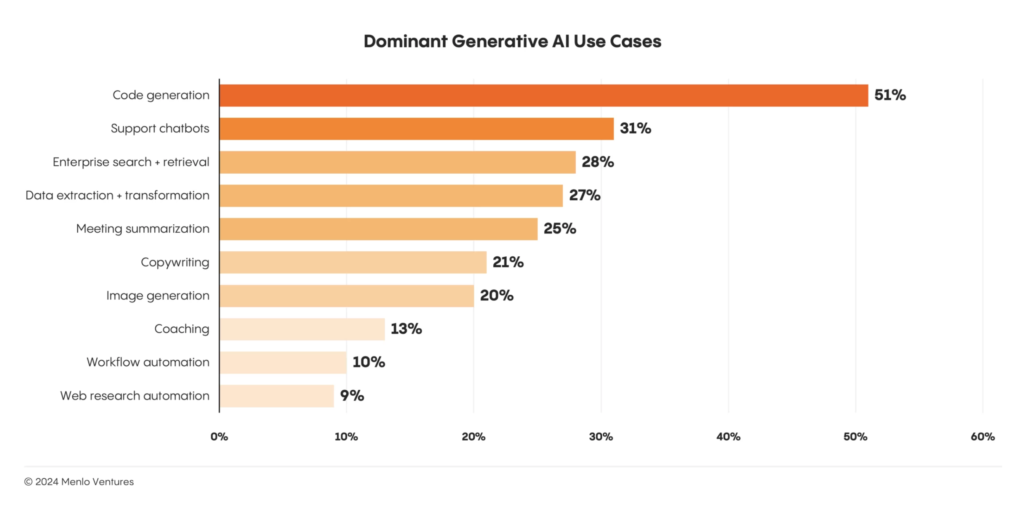
If you look at the chart above you can “see search and retrieval” as well as “Data extraction and transformation”. They are both broad use cases. Do you build a cross-vertical solution for those use cases, or do you say “Let’s extract this data in X vertical and transform it to do Y”? (Personally, we’d prove the tech in the vertical and then move into other verticals from there.)
Cross-Vertical Products
Some AI-based products are naturally cross-vertical. Businesses are all built on the same tech and share common processes. Being the preferred supplier for universal processes like “math” (looking at you, Excel), or “workflow optimisation” or “coding” opens up a huge potential market.
Some of these broad tools include:
- Coding assistants: Tools like GitHub Copilot and Codeium speed up the boring, and sometimes repetitive nuts-and-bolts of programming: test cases, boilerplate, and debugging. They can shorten development cycles and allow for more ambitious projects. It is no wonder they are becoming indispensable for IT and engineering teams in any industry. Given that you can fork an open source code editor like Visual Studio Code, add some interface logic and custom prompts to create your own coding assistant, it is no wonder options in this area keep growing.
- Support Chatbots: There are hundreds of players in the chatbot field. But enterprise has special needs and is demanding. Platforms like Aisera and Cognigy help enterprises automate customer service 24/7, and do it by offering scalable solutions and deep feature sets.
- Enterprise Search + Retrieval: Products like Glean enable semantic knowledge searches across internal documents, CRMs, Slack channels, Google documents, databases – all of an enterprise’s data. And these products provide the fine-grained data access permissions enterprise requires on top of secure and regulatory compliant indexing and ingestion. Permissions, security and compliance – they’re the big challenges. Once that is done these systems are still just chat interfaces to RAG systems with bespoke prompts and AI workflows.
- Data Extraction and Transformation: This is quite similar to 3, and in that way Sana offers similar features to Glean. Data extraction is a form of search and retrieval, but AI, via RAG (and sometimes combined with traditional search tech), brings new ways to search and filter unstructured data, or turn messy data, like scans of handwritten forms, into accessible structured data. This “new” or newly accessible data can then be fed into decision-making processes or further AI applications.
- Meeting Summarisation Tools: That this category, which is Text-to-speech with smarts, ranks so highly speaks to how much time is lost in meetings. Fireflies.ai and Otter.ai are examples of this category. Not only do these products save people time, the summarisations they produce can be fed back into the Enterprise Search and Retrieval tooling so answers and decisions are globally accessible.
Vertical-Specific Products
Cross-vertical tools are the general solutions – toolkits like Glean and Sana where the effort and expense is in security and making them available to an entire enterprise.
For verticals, the products are specialised versions of the general solutions. Here, you need to know the challenges, the data, the reports, and the processes of the vertical. If you can recognise where you can leverage AI and understand how to integrate it and how to convince the stakeholders to integrate it, you’re on your way to a successful product.
Here are some verticals and the kind of AI-based products finding success. Note – this is the US market, which is quite different to the Australian market in how industries like healthcare and financial services operate. Also, all numbers are in $USD.
Healthcare ($500 million in AI enterprise spend):
- Ambient Scribes: Tools like Heidi or Eleos Health (or Lyrebird in Australia) automate medical documentation, reducing the administrative burden for healthcare practitioners.
- Clinical Lifecycle Automation: Solutions targeting triage, intake, coding, and revenue cycle management streamline intricate processes unique to healthcare workflows.
Legal ($350 million in AI enterprise spend):
- Contract Analysis Tools: Products like Harvey provide AI-assisted legal research, let lawyers “query” documents instead of scanning through them, assist in contract drafting much like they do in coding – filling in boilerplate, catching simple errors and types, and some forms of analysis.
- Litigation Support: Platforms such as Everlaw add AI-based search and retrieval to e-discovery processes and speed up trial preparation.
Financial Services ($100 million in AI enterprise spend):
- Risk Assessment and Compliance Tools: Products like Greenlite provide real-time compliance monitoring, while tools like Arkifi use LLMs to accelerate financial research.
- Back Office Automation: Solutions that automate complex reconciliation and reporting workflows can transform accounting processes.
Choosing and Developing Your Product Strategy
Let’s look at one type of product—Enterprise Search + Retrieval. It’s a good place to start as most AI products are built around search and retrieval.
We’ll walk through what a startup creating such a product needs to undertake to ensure its successfully adopted by customers.
Ensuring Integration and Delivering ROI
Your Customer Success strategy needs to ensure that enterprises can integrate your product into their workflows while realising enough measurable value. Here, loosely, are the steps you’re going to need to take.
Step 1: Strategic Alignment and Goal Setting
Before implementation starts you need to work with customers to align your product with their strategic priorities. For an enterprise search product, consider the following actions:
- Identify specific pain points (e.g., fragmented search across emails, messengers, or document repositories).
- Define KPIs such as search accuracy improvement (e.g., from 60% to 90%), query response times (e.g., reducing average time from 10 seconds to 3 seconds), or overall employee productivity gains.
- Ensure stakeholders across IT, HR, and knowledge management buy into the solution’s potential impact.
Step 2: Baseline Assessment
Establish a clear baseline to measure improvements once your product is being used:
- Measure existing search query success rates (e.g., percentage of queries resolved on the first attempt).
- Assess the average time employees spend searching for information daily or weekly.
For example:
- Current query success rate: 60%
- Average weekly search time per employee: 5 hours
These metrics will serve as comparison points post-deployment.
Step 3: Pilot Testing with Focused Use Cases
Run a targeted pilot with a single department or team before rolling out your product enterprise-wide. Keep the scope manageable with focused use cases—for example, deploying within HR for talent management or within IT for knowledge-base retrievals.
Actions to take:
- Collect real-time feedback from users about usability and result quality.
- Begin quantifying benefits such as time savings in accessing key documents.
- Look at how they use it and if there are opportunities for new, specific queries to support their processes.
Step 4: Integration and Scalability Design
Successful generative AI tools must integrate smoothly with existing systems (like Slack, Google Drive, or Microsoft Teams) while maintaining scalability for future needs. Particular attention should be paid to data privacy compliance when dealing with sensitive internal information.
Strategies for success include:
- Partnering with IT stakeholders to ensure seamless integration into existing data sources.
- Creating onboarding documentation or customer training guides to help teams maximise adoption.
- Provide experienced technical support that can assist directly with the integration.
Step 5: Real-Time Monitoring and Iteration
Once your product moves into enterprise-wide use, monitor key metrics and track performance against the benchmarks established during the baseline assessment phase.
Iterate based on feedback by optimising features like query suggestions or integrating additional data sources.
Step 6: Qualitative Impact Assessment
Beyond quantitative metrics, gather qualitative feedback through surveys and interviews. Assess how your product affects employees’ ability to collaborate or make decisions faster based on relevant insights.
Use feedback to refine features and add context-specific improvements.
Step 7: ROI Reporting and Stakeholder Communication
As results accrue, create clear reports that quantify both tangible (e.g., time savings) and intangible (e.g., employee satisfaction) benefits. Focus on linking these metrics back to strategic goals identified earlier.
Example ROI Report Structure:
- Baseline Metrics: Itemize pre-launch performance (e.g., search accuracy at 60%).
- Post-Go-Live Impact: Document achievements (e.g., accuracy improvement to 90%, time savings worth $500K annually).
- Customer Testimonials: Include quotes demonstrating how employees value the tool’s impact on their work.
- Long-Term Predictions: Highlight how ongoing adjustments will deliver scaling advantages across departments.
Step 7 is obviously the most important step, but you should know around step 3 or 4 how you are tracking on delivering value. That will give you opportunities to find and implement the targeted features and applications on top of your product that will win you the customer.
Now is the best time to start building on AI
As generative AI gains momentum in enterprise operations, startups have the opportunity to become embedded within enterprise workflows as the essential solutions providers.
As a startup, you can capture this momentum by either developing wide-reaching cross-vertical products like enterprise search or by addressing industry-specific needs in the vertical of your choosing.
But building a great product is only the first step. Ensuring your enterprise customers realise its potential is where the growth is. Enterprise wants every step of the implementation process to be focusing on delivering value. By investing in Customer Success, and taking all the necessary steps to reduce risk, like pilot testing and monitoring, you can lock customers in and position yourself as the go-to for the market.
We love talking product development. If you want to chat about your product plans, or about how SoftwareSeni could help you execute on them, get in touch.